Voor.ai
Voor.ai
AI AvatarHistoryPricing
Voor.ai

The unified studio for the best AI image & video models. One prompt. Every modality. Production quality in seconds.

Tools
  • Text to Video AI
  • Image to Video AI
  • Text to Image AI
  • Image to Image AI
  • AI Creative Agent
More tools
AI Video Models
  • Seedance 2.5
  • Muse Video
  • HappyHorse 1.1
  • Seedance 2.0 Mini
  • Kling 3.0 Turbo workflow
  • Veo 3
  • Kling v2.1
  • Vidu Q3
More video models
AI Image Models
  • Seedream 5 Lite
  • Seedream 5 Pro
  • GPT Image 2
  • Nano Banana 2
  • Nano Banana
  • Ideogram v3 Quality
  • Seedream 4.5
  • Seedream 4
More image models
Company
  • Pricing
  • Blog
  • What's New
  • Contact Us
  • Terms and Conditions
  • Privacy Policy
  • Refund Policy
  • SeeWhatNewAI
  • Findly.tools
  • CurateClick
  • YouTube
  • Discord
Partners
  • Krea 2 AI workspace
  • Seedance 2.5 AI workspace
  • Seedream 5.0 Pro workspace
  • Toolsify AI directory
  • AI Website Directory listing
  • FutureTools AI directory
  • ShowMySites directory
  • make.rs maker directory
  • Featured on ToolDirs
  • Featured on Wavel
  • Stork Verified — stork.ai AI tools directory
  • Featured onAInexfinder — AI Tools Directory
  • AiTop10 Tools
  • Featured on AI Tool Zaar
  • LogoFeatured onTools Rollerss
  • Featured on Smol Launch
  • Featured on AIExtension.ai
  • Featured on Findly.tools
  • Featured on DeepLaunch.io
  • Featured on ShowMeBestAI
  • Featured on Twelve Tools
  • Launched on Fazier
  • Good AI Tools
  • Listed on Turbo0
  • Voor AI - Featured on Startup Fame
  • Featured on Aura++
  • Featured on toolfame.com
  • Featured on saasfame.com
  • Featured on aitoolfame.com
  • Featured on FoundrList
  • OpenHunts Club Member
  • Featured on PopWebTools
  • Feature On Launch Vault
  • Featured on AIBoom.Tools
  • Listed on SaaS Cubes
  • Featured on Web Review
  • Featured on Dofollow.Tools
  • Featured on SumoDir
  • Featured on Wired Business
  • Featured on FreeAI
  • Featured on Gets.Tools
  • Featured on AIBlog.Tools
  • Featured on doforai.tools
  • Listed on SwapLink
  • Featured on Best AI Tool
  • Featured on AiWebsite.run
  • Featured on LaunchBoosts
  • SeekTool.ai Tools Directory
  • Top AI Tools
  • AI Tool Trek
  • List on Similarlabs
  • YouWant.ai
  • What Is Ai Tools
  • Launched on Tiny Startups
  • Listed on uno directory
  • Powered by Startup Fast
  • Featured on submitdeck.com
  • Featured on TheAIToolsDir
  • Featured on Toolfio
  • Featured on NewTool.site
  • Find us on Indie.Deals
  • Verified on DANG!
  • Featured on Starter Best
  • Find us on Firsto
  • Tool Ignite
  • SaaS Avenue
  • Appsy Tools
  • LiftOff launch badge
  • ai tools code.market
  • Featured on Super Launch
  • Featured on Open-Launch
  • Listed on AI Tools Lister
  • MossAI Tools
  • AI Hustle
  • Featured on geoly.net
  • Submit AI Tools
  • RightAI Tools
© 2026 Voor.ai. All rights reserved.Crafted for creators

GPT Image 2 is OpenAI's instruction-following image model on Replicate — generation, editing, typography, and multi-image input explained with live examples.

Required
Paid access required for this setup · 282 credits · failure refunded
Example Image
Photoreal default register

Generator examples

  • Photoreal default register
  • Instruction-following layout
OpenAIReplicateInstruction following

What Is GPT Image 2? OpenAI's image model on Replicate

What Is GPT Image 2 is the explainer query behind OpenAI's newest public image checkpoint — `openai/gpt-image-2` on Replicate and inside API tool routes. What Is GPT Image 2 matters because it is not another diffusion toy: it is tuned for instruction following, readable short text, photoreal portraits, and edit passes that respect the reference frame. On Voor AI, What Is GPT Image 2 resolves to the same generator as `/gpt-image-2`, but this page keeps the title, H1, and FAQ aligned with informational intent instead of demo-only traffic. What Is GPT Image 2 supports text-to-image generation, image editing with prompts, and multi-image conditioning for layouts that reference several plates. What Is GPT Image 2 does not replace your legal review — likeness, trademark, and platform policy still apply. The portrait and infographic samples above were produced with What Is GPT Image 2 class prompts on `openai/gpt-image-2`.

Try GPT Image 2
Generation + edit• Typography• Multi-image input
Editorial portrait sample from GPT Image 2
Photoreal default register
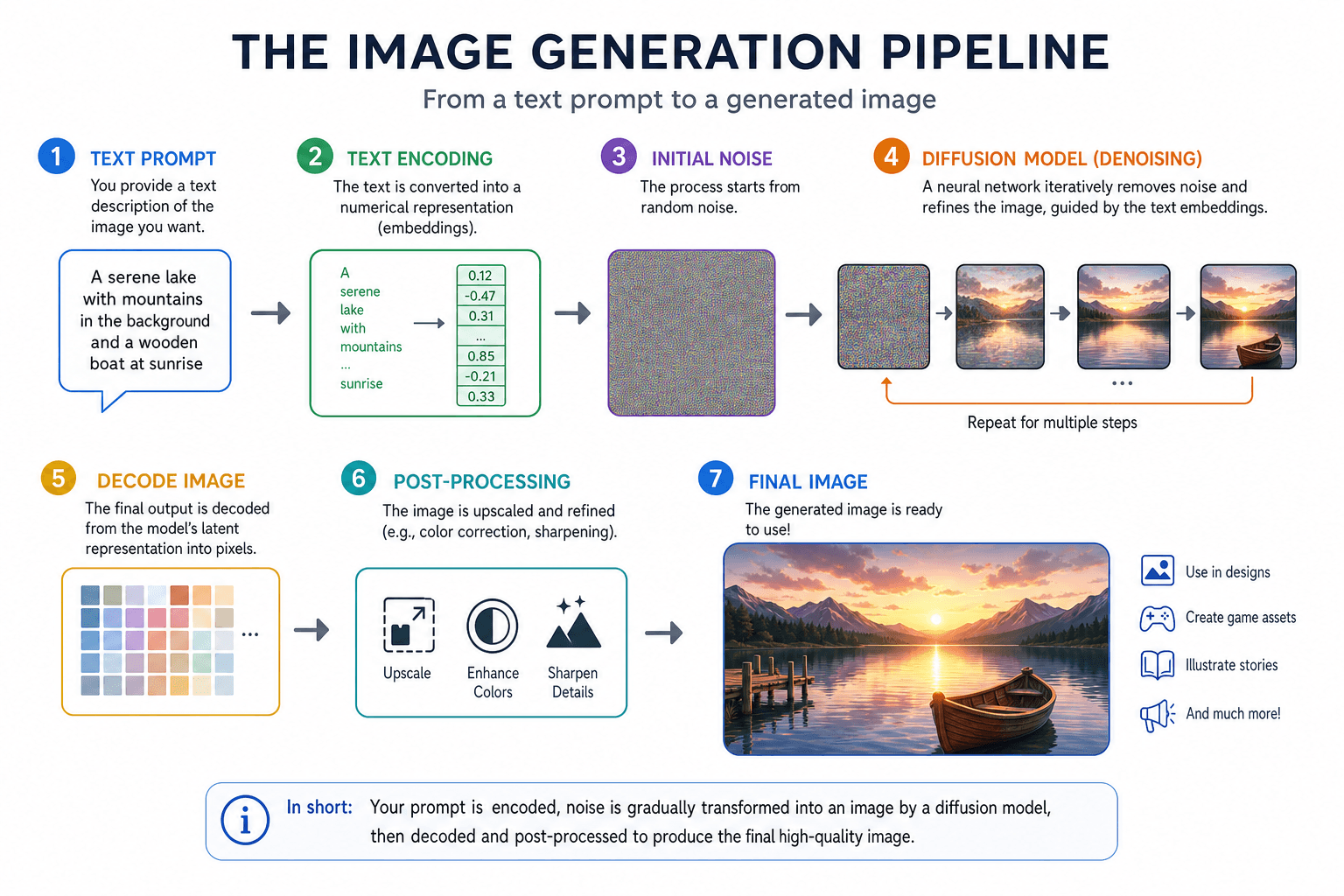
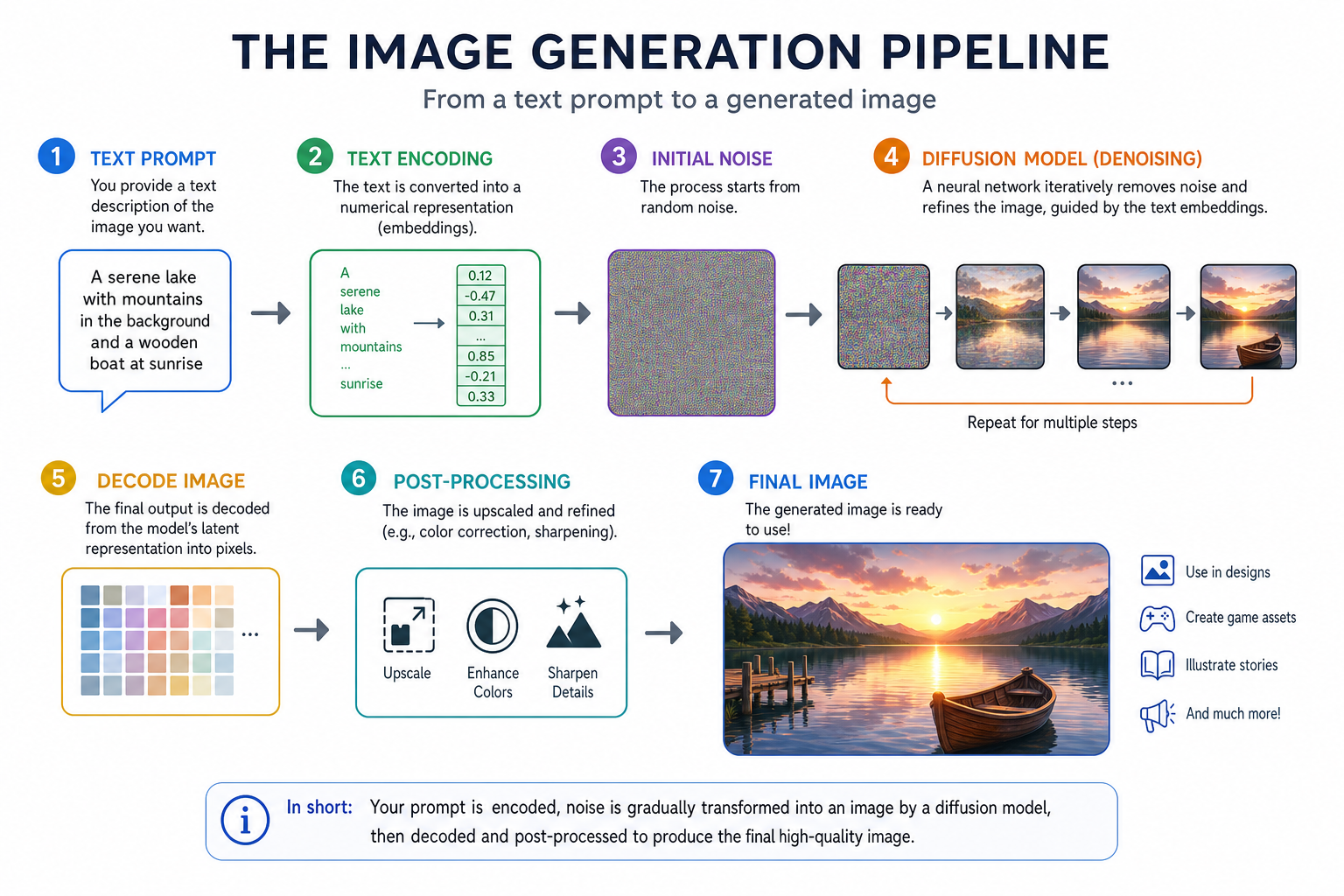
Infographic explaining GPT Image 2 pipeline
Instruction-following layout

What Is GPT Image 2 technically?

What Is GPT Image 2 is OpenAI's image-generation and editing model exposed as `openai/gpt-image-2`. It competes with GPT Image 1.5, DALL·E-era workflows, Nano Banana, and FLUX on quality, but leads on instruction following for many marketing briefs.

What Is GPT Image 2 accepts text prompts plus optional images for edit and composition tasks. Outputs are raster PNG/JPEG suitable for social, pitch decks, and mockups — not vector logos.

What Is GPT Image 2 limitations: extreme photoreal identity lock, sub-pixel logo accuracy, and long paragraphs on-image still fail. Plan compositing for legal-critical brand assets.

What Is GPT Image 2 good at?

Four pillars that answer What Is GPT Image 2 in production terms.

Instruction fidelity

What Is GPT Image 2 tracks multi-clause prompts — subject, lens, lighting, mood — without dropping the second half. Brief it like a creative director, not a tag cloud.

Edit mode

What Is GPT Image 2 editing keeps identity while swapping wardrobe, backgrounds, or small props. See `/how-to-use-gpt-image-2` for click-level steps.

Typography

What Is GPT Image 2 renders short English headlines on posters more reliably than many open models. Keep copy to a few words.

API parity

What Is GPT Image 2 on Replicate mirrors the Responses API tool contract — teams can prototype on Voor AI, then wire the same prompts into backend jobs.

How to try What Is GPT Image 2 on Voor AI

Informational searches should still end in a real render — three steps.

1

Open the generator with GPT Image-2 selected

What Is GPT Image 2 runs as `openai/gpt-image-2` in the model dropdown on this route.

2

Run a neutral test prompt

Example: 'Editorial portrait, soft window light, 50mm, natural skin'. What Is GPT Image 2 baseline quality shows up without trick prompts.

3

Branch to prompts or tutorial pages

Deepen on `/gpt-image-2-prompts` for recipes or `/how-to-use-gpt-image-2` for editing workflows once What Is GPT Image 2 clicks conceptually.

Open generator

Why teams ask What Is GPT Image 2 before adopting

Procurement wants to know What Is GPT Image 2 versus FLUX or Nano Banana before approving credits. This page is the internal FAQ link.

Developers ask What Is GPT Image 2 to confirm Replicate IDs match their OpenAI API docs — alignment reduces integration surprises.

What Is GPT Image 2 — FAQ

What Is GPT Image 2 vs GPT Image 1.5?+

What Is GPT Image 2 is the newer checkpoint with stronger instruction following and edit tooling on Replicate.

What Is GPT Image 2 pricing on Voor AI?+

Credit-based per render — see `/pricing`. What Is GPT Image 2 cost scales with resolution and edit passes.

What Is GPT Image 2 for video?+

Still images only. Animate exports with image-to-video models separately.

Where is the main tool page?+

`/gpt-image-2` is demo-first; this URL targets What Is GPT Image 2 informational queries.

Now that you know What Is GPT Image 2 — run it

What Is GPT Image 2 is OpenAI's instruction-first image stack on Replicate — test it in the generator above, then promote prompts to production.

Generate

Voor AI ToolKit

The most relevant Voor AI tools for this workflow. Explore the full catalog for more.

GPT Image-2

GPT Image-2

OpenAI's ChatGPT Images 2.0 model online — text-to-image, image-to-image, sharp text rendering.

GPT Image 2 Prompts

GPT Image 2 Prompts

Copy-ready GPT Image 2 prompts for portraits, products, posters, and edits — structure, negative cues, and reroll strategy on Voor AI.

How to Use GPT Image 2

How to Use GPT Image 2

Step-by-step How to Use GPT Image 2 on Voor AI — pick the model, write prompts, run edits, download PNG, and iterate without a local GPU.

Explore more AI tools→