
Catalogue still life
One product, one surface, one light. Ask Seedream 5.0 Pro for the falloff and the reflection behaviour by name rather than for a mood.
Seedream 5.0 Pro is ByteDance's professional image tier: 1K to 2K stills, up to ten reference images per request, and edits that hold the frame you already approved.

One run, unretouched
A perfumer's workbench at dawn: a faceted glass flacon catching a shaft of window light, an amber dropper bottle, dried botanicals and a scattering of test strips on scarred oak, real caustics thrown through the glass, dust in the air, cold blue shadow against warm highlight, editorial still life photography, no text
No inpainting, no upscale, no second pass. The caustics under the flacon and the dust in the light beam are both from the same generation, which is the reason to reach for this tier on glass, liquid, and polished metal.
Same brief, same seed
Both frames below came from the identical prompt, the identical seed of 90311, and the identical 2496 × 1664 canvas. The only variable is the tier, so every difference you can see is the model, not the brief.

Seedream 5.0 Pro read the brief as a photograph. The overcast light stays on the left, the depth of field falls off behind the case, the beading is scaled to a real crystal, and the movement is half exposed exactly as asked.
Cutaway product photograph of a mechanical dive watch resting on wet slate, the movement half exposed so brushed steel, ruby jewels and a coiled hairspring are all readable, cold overcast daylight from the left, water beading on the crystal, shallow depth of field, editorial catalogue still life, no text
There is one hard difference underneath the aesthetics: Seedream 5.0 Pro will render at 1K, while Lite rejects any request below roughly 3.7 megapixels. If you want cheap drafts before committing, that floor is the deciding factor. For drafts that need speed more than mechanical accuracy, Seedream 5 Flash renders the same 2K canvas in roughly a third of Pro's time at 10 credits per image.
Up to ten plates per request
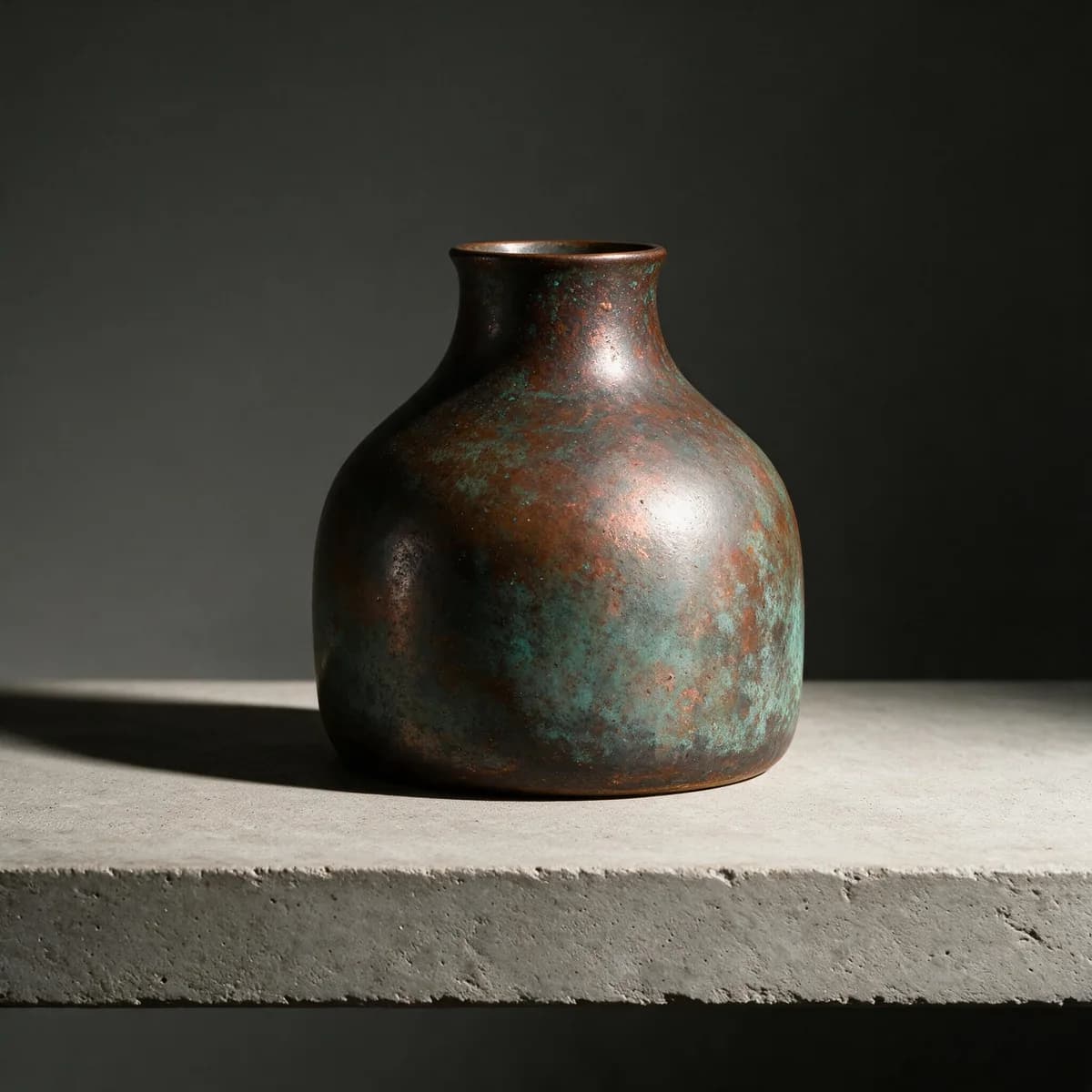
The result on the right was built from the three plates below plus one sentence. Each plate was given a single job, and the written brief only had to say which job belonged to which plate. Select a plate to see what it contributed.
Wide belly, narrow neck, flared lip
One plain object on white, lit flat. It carries the proportion and nothing else — no colour worth copying, no lighting worth copying.
Three published tiers
Same prompt, same seed of 55840, one tier at a time. Each panel is the centre of its own frame at native pixels, scaled to the same width — so the softness you see at 1K is real detail loss, not a rendering trick.

The cheapest tier and the only one Lite refuses to render. Screw heads and cloth fibres are present but soft — fine for layout tests, thumbnails, and deciding which idea to keep.
Notice that the bench itself is arranged differently on every rung. Seedream 5.0 Pro re-composes when the canvas changes; it does not enlarge an existing layout. Pick the tier you intend to ship at before you start refining the frame.
One reference, one change
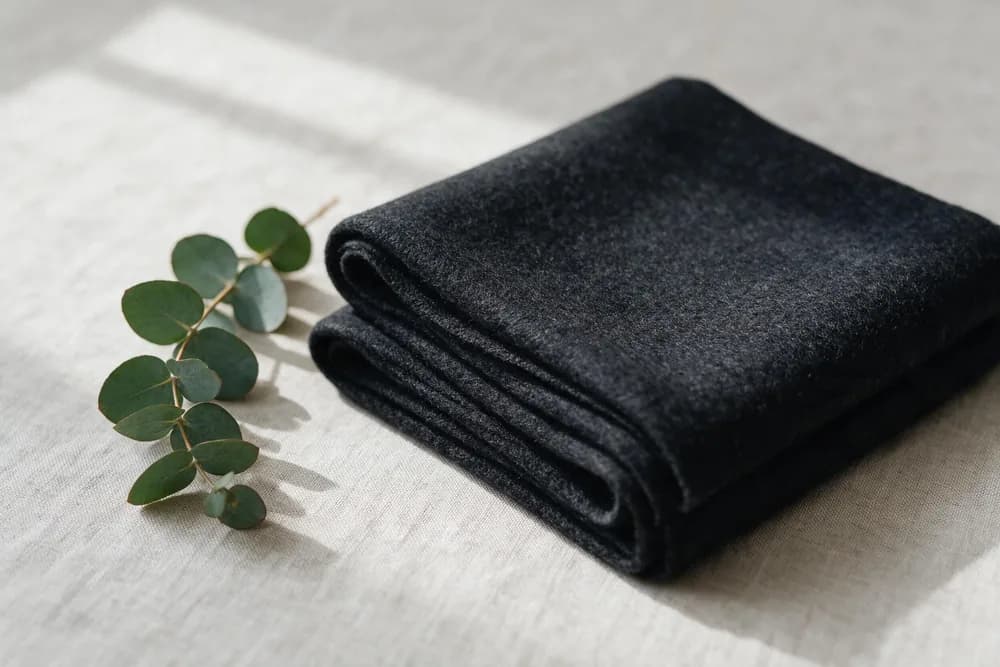
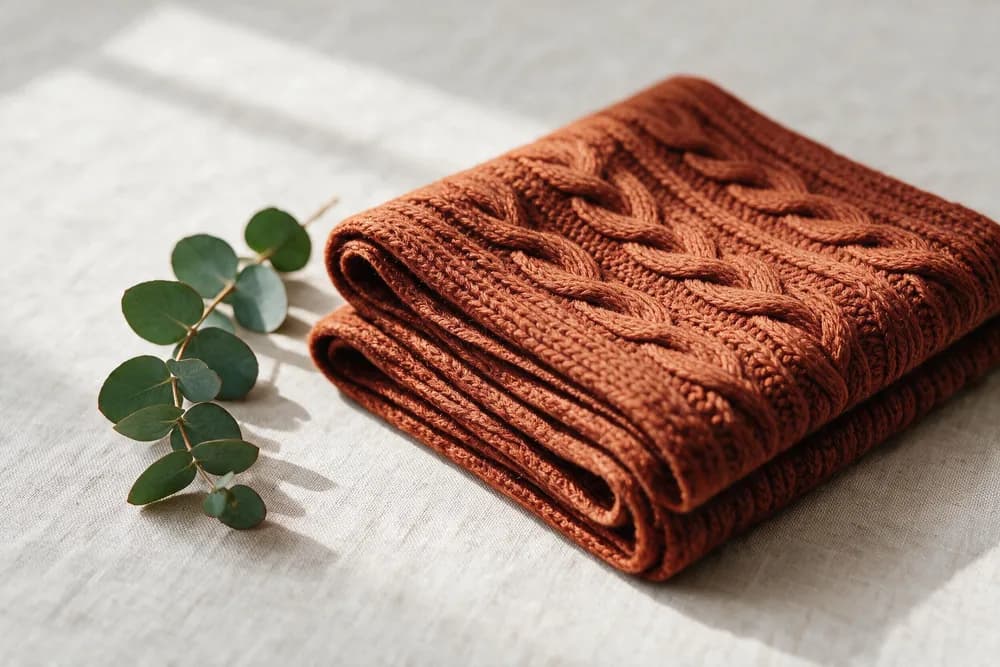
The instruction was a preservation list followed by a single change. Everything on this list came back untouched:
Write edits this way and Seedream 5.0 Pro behaves like a retoucher. Describe the whole scene again and it behaves like a new generation — same subject, different photograph.
Four layers
Name the object, its material, and its state. Seedream 5.0 Pro renders material behaviour well — matte glaze, brushed steel, wet slate — so material words do more work than adjectives about mood.
Give direction, quality, and colour: hard key from the right, cold overcast from the left, warm highlight against blue shadow. This is the instruction Seedream 5.0 Pro is most reliable at following.
State the framing, the height, and the depth of field. Without it the model picks a flattering default, which is why two runs of the same brief can feel like different products.
Close with what must not happen — no text, no extra objects, no props outside the list. Constraints are the cheapest way to stop a Seedream 5.0 Pro run from drifting.
One product, one surface, one light. Ask Seedream 5.0 Pro for the falloff and the reflection behaviour by name rather than for a mood.
Push glass, glaze, brushed metal, and wet stone into the same frame and check which surface breaks first.
Lock a hero shot, then feed it back with one colour instruction per run to build a shelf of options.
Describe the box geometry and the surface finish; set the real typography in your layout tool afterwards.
Send an empty set as a reference plate and audition subjects inside a lighting setup you already like.
One room, one window, one time of day. Seedream 5.0 Pro holds a single believable light source better than three competing ones.
Steam, crumb structure, and a shallow plane of focus, with the plate edge cropped rather than centred.
Generate at 2K and crop tiles out of the result — the top tier survives being cut into pieces.
Silhouette, palette, and lighting from three plates, and a written brief that only resolves the conflicts between them.
Pass an approved frame back to Seedream 5.0 Pro with a preservation list and change exactly one thing.
Run 1K drafts to fill a board fast, then re-brief only the frames that survive the review.
Let it compose the diagram and the hierarchy, then verify every label yourself before it goes anywhere near publication.
Typography is the first thing to fail. Short labels usually survive, but headlines, small print, and anything in a second script should be treated as a placeholder and set properly in your layout tool.
Diagrams are the second. Seedream 5.0 Pro composes an information graphic that looks authoritative long before the relationships inside it are correct, so every arrow and label needs a human pass before publication.
And 2K is the ceiling on this tier. When a print deliverable needs more, the higher Seedream 5.0 tiers reach 3K and 4K — the trade is resolution for the drafting economy you get down at 1K.
Seedream 5.0 Pro is the professional tier of ByteDance's Seedream 5.0 image family. It generates and edits stills at 1K, 1.5K, and 2K, accepts up to ten reference images in a single request, and returns PNG or JPEG.
The tiers publish different resolution ranges. Seedream 5.0 Pro covers 1K, 1.5K, and 2K, so it will render small; Lite starts at 2K and rejects any request under roughly 3.7 megapixels. Given the same brief and the same seed, Pro tends to hold the photographic instructions — framing, depth of field, light direction — while Lite pushes harder on surface drama.
Up to ten per request. Each reference should carry one job — silhouette, palette, lighting, material, or layout — because a stack of near-identical references gives the model nothing extra to separate.
Yes. Pass your image as the reference and write the instruction as a preservation list plus one change. In our test the framing, window light, eucalyptus sprig, and shadow pattern all survived while only the fabric changed, which is the behaviour to aim for.
The 1K, 1.5K, and 2K tiers, plus explicit pixel sizes such as 2496x1664 for a 3:2 frame or 2048x2048 for a square. A 2K landscape request came back at 2496x1664 in our runs.
No, and this catches people out. Running the same prompt and the same seed at 1K, 1.5K, and 2K produced three different layouts of the same bench, not one layout at three sizes. Choose the tier first, then iterate on the composition inside it.
Short labels are usually fine; dense paragraphs, small type, and long headlines still degrade. Treat any typography it produces as a placeholder to be proofread, and set real text in your layout tool when the wording has to be exact.
Generations run on credits. New accounts start with a free credit balance that covers a handful of test images, which is enough to compare the tiers on your own brief before committing to a batch.
Skip it when you need output above 2K — the higher Seedream tiers go to 3K and 4K — or when the deliverable is a factual diagram. It composes convincing information graphics, but the labels and relationships still need a human to verify them before publication.
Seedream 5.0 Pro sits between Seedream 5.0 Lite and the higher 3K and 4K tiers. If you arrived looking for the family as a whole, the Seedream 5 page covers Lite and Pro side by side; this page is the Pro tier on its own.
Name the material, the light direction, the framing, and what must not appear — then let the reference plates carry everything else.
Start creatingOptional cookies help us understand usage and measure ads. Essential cookies stay on so Voor works.