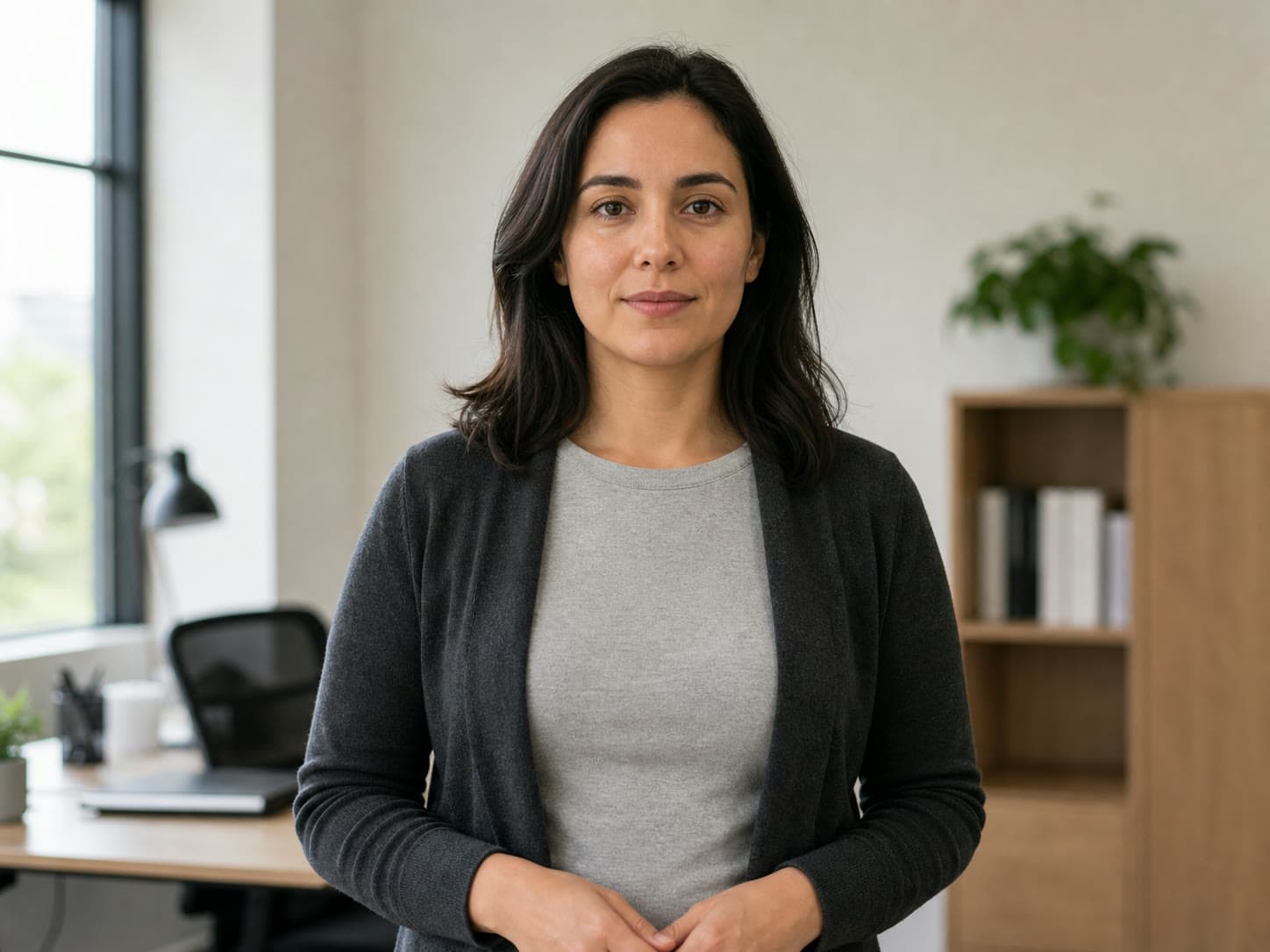
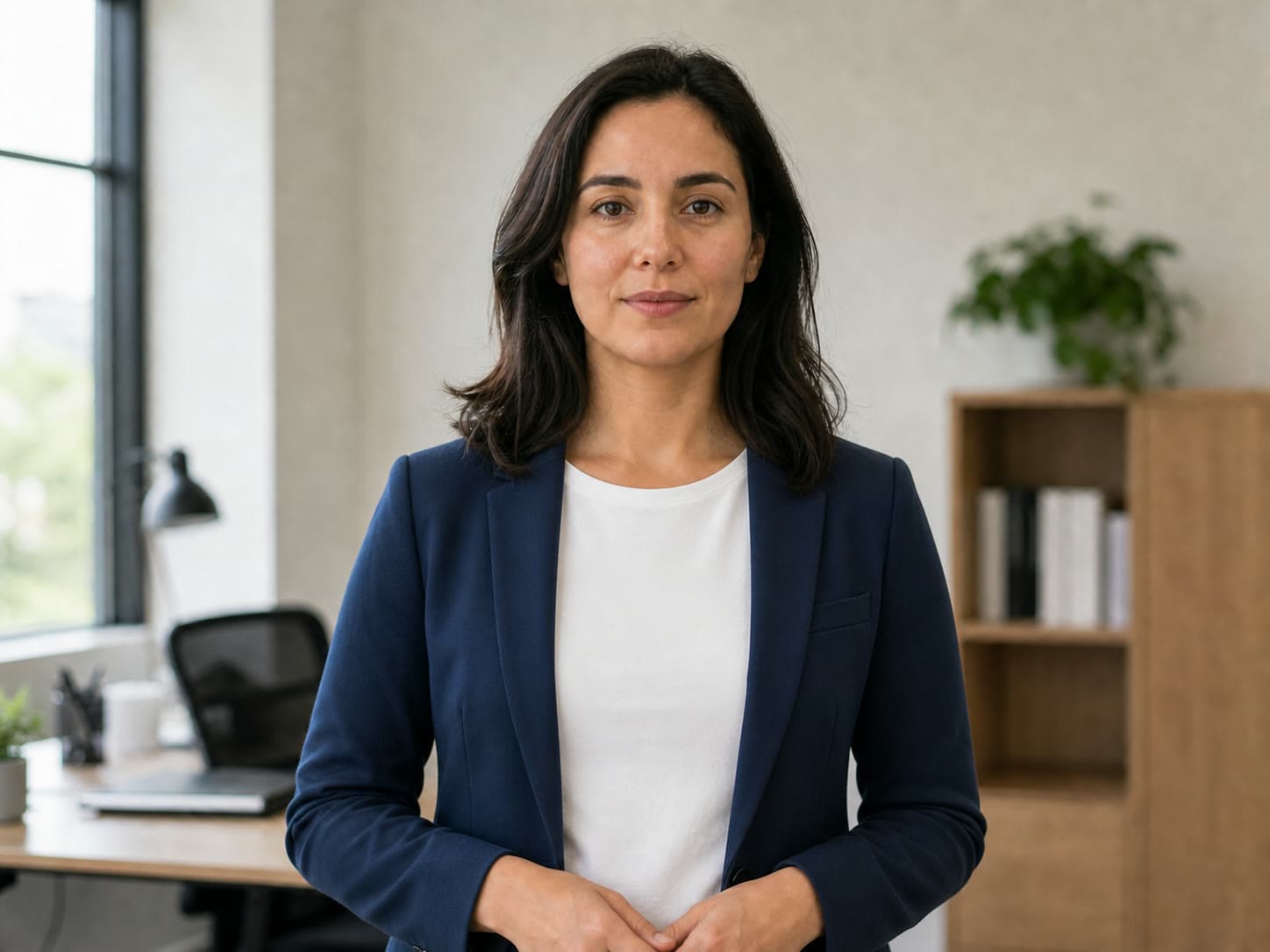
A synthetic source and two controlled edits: one visible change per pass, with the same identity, pose, crop, and lighting held steady.
Synthetic source
AI image editor Seedream 4.5: clear synthetic test portrait, even light, one subject.
Wardrobe only
AI image editor Seedream 4.5: replace cardigan and shirt with a navy blazer and white crew-neck only — preserve face, hair, hands, pose, crop, background, and lighting.
Background only
AI image editor Seedream 4.5: replace the office with a soft warm-gray studio only — preserve subject, wardrobe, pose, crop, and light direction.
Relight — AI image editor Seedream 4.5
One lighting change only. Face, pose, and wardrobe stay locked.
Flat middayGolden hour
Object remove — AI image editor Seedream 4.5
Remove one object and inpaint the path. List what must stay pixel-perfect.
With coneCone removed
Add glasses — AI image editor Seedream 4.5
Add one prop without drifting identity. Keep hair, pose, and background identical.
No glassesGlasses added
14 AI image editor Seedream 4.5 edits
01
Change jacket color only — preserve face and pose.
02
Remove background person — fill with plausible wall.
03
Relight to golden hour — same composition.
04
Add glasses — identity unchanged.
05
Swap sky to sunset — horizon line locked.
06
Product label colorway variant.
07
Extend canvas top for ad copy space.
08
Remove power lines from landscape.
09
Formal wardrobe upgrade — same face.
10
Seasonal snow overlay on street photo.
11
Fix closed eyes — minimal expression change.
12
Cartoon style — preserve likeness.
13
Cleanup trash in park scene.
14
A/B two preserve lists before batch edits.
AI image editor Seedream 4.5 edit types
Wardrobe
Swaps clothing when preserve list locks face and pose.
Background
Replaces scenery — subject cutout stays sharp.
Cleanup
Removes one object and inpaints plausible fill.
Relight
Changes mood and light — geometry unchanged.
One edit, one preserve block
The strongest Seedream competitors expose modes and 4K settings. Voor adds a repeatable edit method so the source photo remains the source of truth.
SCOPE
Name one change
Wardrobe, background, relight, cleanup, or glasses—never stack all five into one pass.
PRESERVE
Lock identity
Write face, hair, pose, body geometry, and any brand elements into a short preserve block.
QA
Inspect at 100%
Check eyes, logos, hands, fabric folds, and filled background texture before approving the edit.
DELIVER
Handoff with the prompt
Export PNG for retouching and save the preserve block so another editor can reproduce the constraint.
Evidence notes
Controlled editing from brief to delivery
Reference-image boundaries, full-resolution review, multi-pass planning, and a reproducible handoff turn a plausible edit into a controlled deliverable.
Brief
Turn a request into one measurable edit
Translate a broad request into a single visible difference: replace the jacket color, remove one passerby, relight the same scene, or repair one label. Write a second sentence that names what cannot move. This separation gives reviewers a clear pass-or-fail condition and prevents a good background edit from quietly changing the subject. When a client asks for several changes, keep the approved output from each pass as the input to the next one.
Reference
Use references for structure, not vague inspiration
A reference image is most useful when you state what it contributes: palette, garment shape, material, layout, or lighting direction. Avoid asking the model to copy an entire unrelated image while preserving every property of the source. For catalog work, reuse the same reference and preserve sentence across a product family. That creates a stable editing system instead of a fresh creative interpretation for every SKU.
Review
Inspect the places thumbnails conceal
Review at native size before approval. Look at pupils, teeth, fingers, jewelry, small logos, repeated patterns, hard object boundaries, and reflections. A convincing thumbnail can still contain a misspelled label or a background seam. Compare against the source with a slider and record whether the requested area improved without identity, geometry, or brand assets drifting. If the edit fails, tighten the boundary before adding more descriptive adjectives.
Delivery
Package the result so another editor can reproduce it
Keep the source file, selected output, model name, prompt, preserve sentence, and approval note together. Use PNG when the file will enter another retouching pass; choose a high-quality web export only after the master is accepted. If the image will be animated, approve the still first and hand that exact frame to the motion workflow. This prevents downstream teams from rebuilding an almost identical source with different facial or product details.
AI image editor Seedream 4.5 — FAQ
What is AI image editor Seedream 4.5?
AI image editor Seedream 4.5 is instruction-driven photo editing on Voor AI using bytedance/seedream-4.5 — one sentence changes, identity preserved, up to 4K output.
How does AI image editor Seedream 4.5 work?
Upload a photo, pick an AI image editor Seedream 4.5 preset, describe the single change. The bar prepends edit scaffolds so you list preserve rules explicitly.
Is AI image editor Seedream 4.5 free to try?
New accounts receive 3 welcome credits. The generator shows the credit estimate before you run; presets and guides are free to browse.
AI image editor Seedream 4.5 vs text-to-image Seedream?
AI image editor Seedream 4.5 starts from your photo. Text-to-image Seedream 4.5 generates new pixels — use the editor when the source must survive.
Can AI image editor Seedream 4.5 remove objects?
Yes — ask AI image editor Seedream 4.5 to remove one object and fill background plausibly. List what must stay unchanged.
Can AI image editor Seedream 4.5 change clothes?
AI image editor Seedream 4.5 can swap wardrobe when you preserve face, pose, and lighting in the prompt.
Does AI image editor Seedream 4.5 need masks?
No manual masks — AI image editor Seedream 4.5 uses natural-language instructions with Seedream 4.5 instruction editing.
What resolution for AI image editor Seedream 4.5?
AI image editor Seedream 4.5 supports up to 4K on Voor AI when the source resolution allows — exports PNG/JPEG/WebP.
Where to compare AI image editor Seedream 4.5?
See /seedream-4-5 for generation and this AI image editor Seedream 4.5 guide for instruction-edit presets.
AI image editor Seedream 4.5 batch catalog tip?
Lock the preserve block, vary only garment color between SKU rows — AI image editor Seedream 4.5 keeps shadow direction and background identical across the grid when constraints stay in text.
AI image editor Seedream 4.5 relight plus wardrobe?
Split into two AI image editor Seedream 4.5 passes — relight and wardrobe in one generation often drifts identity when the client needs both changes on the same source photo.
AI image editor Seedream 4.5 logo inspection?
Zoom to 100% on letterforms after every AI image editor Seedream 4.5 pass — instruction edits can subtly warp type even when the subject looks perfect at thumbnail size.
AI image editor Seedream 4.5 handoff ticket?
Name export format, preserve block, and change verb in the ticket — retouchers rerun AI image editor Seedream 4.5 faster when constraints live in text, not only in the finished JPEG.
Edit with AI image editor Seedream 4.5
Upload, pick preset, name one change, list preserves.