
Stay with Meshy 7 when…
the surface is the point — scales, carving, a collectible you will print — or you can show the object from several sides. Default output sits near 31,000 triangles.
Meshy 7.1 from Meshy: describe an object, upload one image or add up to four views, and get a textured GLB with optional Ultra 2K or 4K geometry.
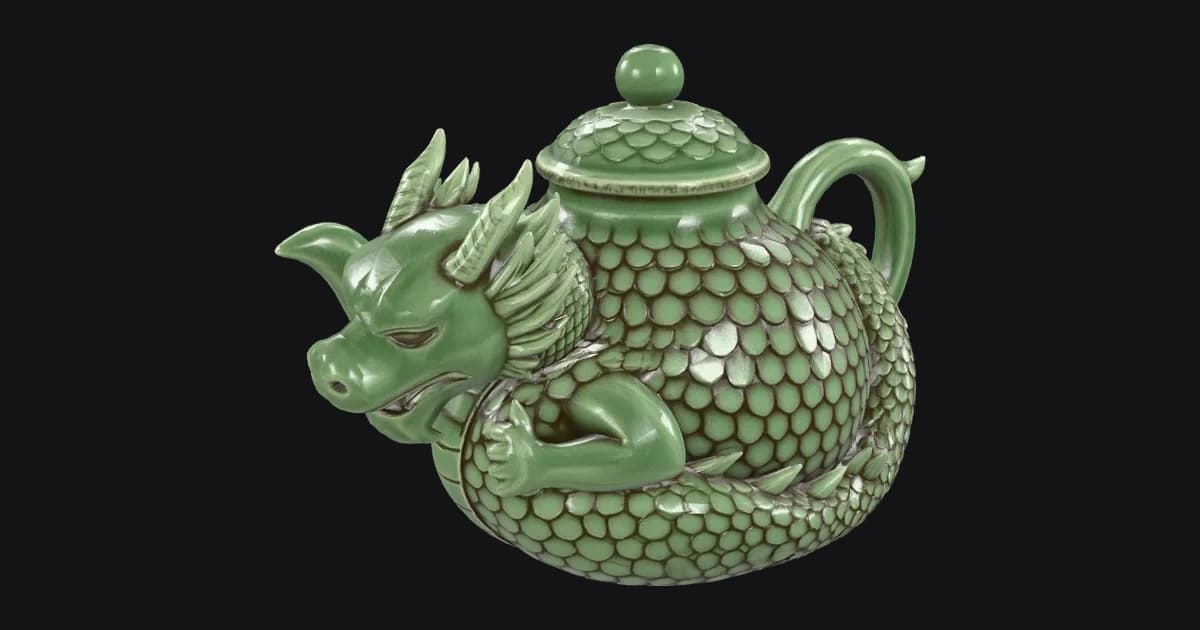
Meshy · version 7.1 · text to 3D

The downloadable file itself. Drag to turn it, scroll or pinch to zoom.
Prompt against result
Meshy 7 delivered every request about surface — glaze, scales, expression — and normalised every request that would have made an unusual teapot. If a functional part must be strange, give it its own sentence, or sketch it and use image mode.
Sleeping dragon curled around itselfkept
Closed eyes, coiled body, head resting against the pot.
Overlapping engraved scales along the backkept
Sculpted, not painted — they survive the clay pass above.
Celadon glaze, darker crackle in the recesseskept
Pale green glaze with darker tone settling between the scales.
Ridged spine that becomes the lid handlechanged
The lid got a round knob and a ring of scales instead.
Curled tail forming the pot handlechanged
A conventional loop handle; the tail wraps the base.
Snout forming the spoutchanged
Meshy 7 kept a separate spout beside the head.
One view or three
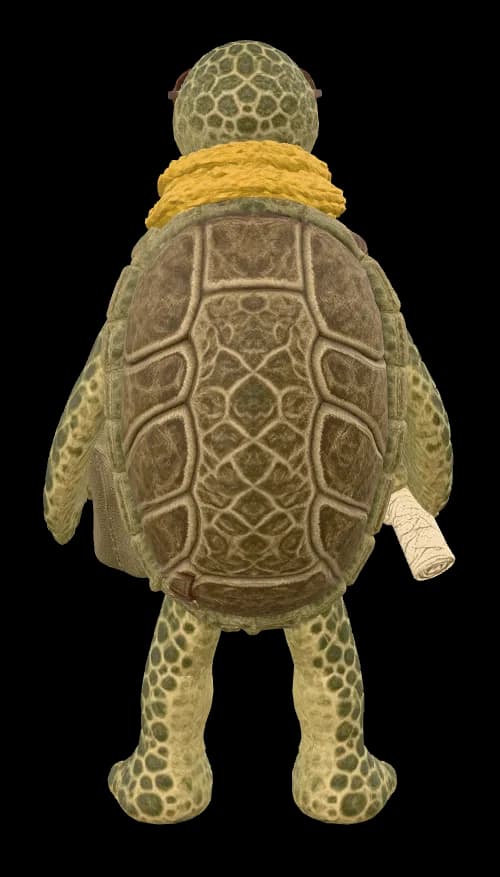
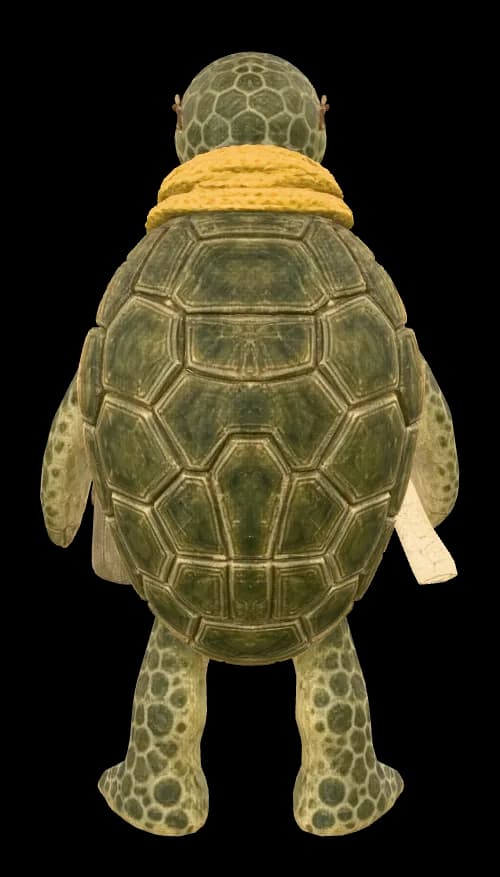
We drew one turtle courier as a turnaround — front, side, back — and ran Meshy 7 twice with identical settings: once with the front alone, once with all three views through multi-image mode. Both viewers open from behind, because that is where the runs differ.
Images sent to Meshy 7
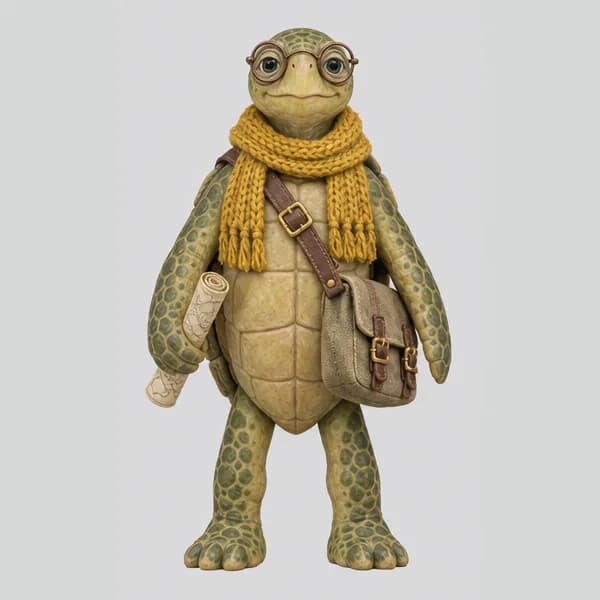 Front · sent
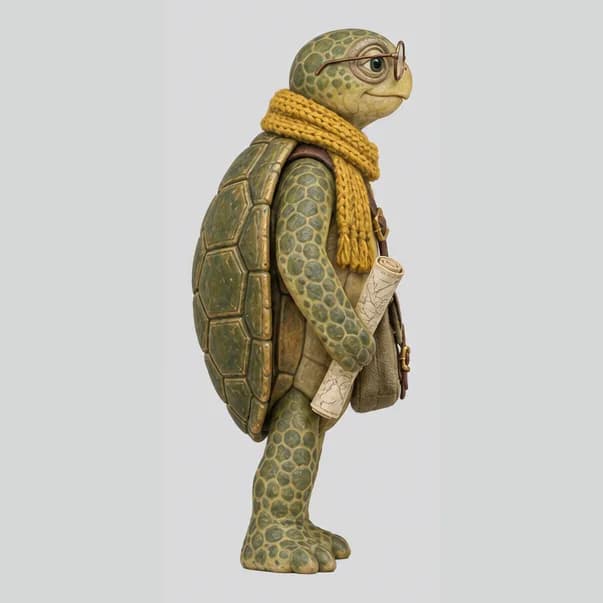 Side · sent
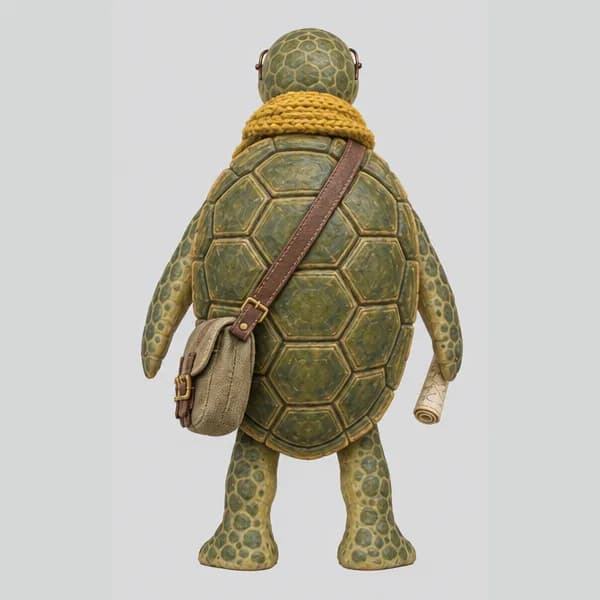 Back · sent
Send one to four pictures with identical pose, scale and lighting, one object on a plain background; the angles that differ most from the front help most. Multi-image mode tops out at Ultra 2K.
Starting points
Every Meshy 7 control on Voor maps to a decision about where the detail should live — geometry, texture or neither. Pick the closest job and copy the values into the generator above.
279 credits
A printer ignores colour, so skip the texture pass and spend the budget on geometry. Import the GLB into Blender and export STL for the slicer. With an image, switch Texture off for the same saving.
Every Meshy 7 setting on Voor
Limits: prompts stop at 600 characters, results are static GLBs with no rigging, and lettering on an object comes back as texture, never readable type.
the surface is the point — scales, carving, a collectible you will print — or you can show the object from several sides. Default output sits near 31,000 triangles.
the model is headed for a real-time game. Our Tripo P2 runs landed near 5,000 triangles, and its quad mode exports an FBX ready for editing.
you have up to ten real photographs and need a declared real-world size, or move to text to 3D for a staged scene rather than a single object.
Meshy 7 is the 3D generation model from Meshy, the Silicon Valley 3D AI company. It turns a text prompt, one reference image, or up to four views of an object into a textured 3D model. Voor runs the September 2026 update, Meshy 7.1, in all three modes.
Both names point to the same model line. Meshy 7.1 is the point release of Meshy 7 that added Ultra 2K and Ultra 4K geometry, and it is the version the Meshy 7 generator on this page runs. Every example here came from Meshy 7.1.
A textured Meshy 7 model costs 419 credits in every mode, including Ultra 4K geometry and PBR maps. Untextured geometry — preview mode for text, or Texture switched off for images — costs 279 credits. The generator shows the estimate before you start, and new accounts get free welcome credits to try it.
One binary glTF file (.glb) with geometry, UVs and textures in a single container, which Blender, Unity, Unreal, Godot and most slicers open directly. For FBX, OBJ, STL or USDZ, import the GLB into Blender and export from there.
It raises the resolution Meshy 7 sculpts at, so small relief such as scales, engravings and stitching becomes real geometry instead of painted texture. Our teapot used Ultra 4K, and its clay pass still shows every scale with all textures removed. It is slower than standard, costs the same credits, and works for text and single-image runs only.
Whenever the back of the object is different from the front and you can show it. In our test the front-only run invented a brown patterned shell for the turtle, while the three-view run copied the green hexagonal plates from the back reference. Keep the pose and scale identical in every view and use two to four images.
No. Meshy offers auto-rigging elsewhere, but the Meshy 7 generator on Voor returns a static textured mesh. Rig the GLB afterwards in Blender or Mixamo; choosing quad topology and symmetry on gives cleaner deformation for that step.
Our runs took 124 seconds for one image, 178 for three views and 249 for the Ultra 4K text prompt. Plan on two to five minutes; the GLB waits in your history.
Pick Meshy 7 when surface detail matters — collectibles, sculpted props, 3D printing — and when you can supply several views. Pick Tripo P2 when you need a light game-ready mesh: our Tripo P2 tests landed near 5,000 triangles against roughly 31,000 for Meshy 7 at its default polygon budget.
Start with one object, one sentence about its shape and one about its surface. Check the credit estimate, then orbit the GLB before you download it.
Generate with Meshy 7Optional cookies help us understand usage and measure ads. Essential cookies stay on so Voor works.