Upload your portrait — wood crosshatch, metal plate stipple, or linocut graphic cuts. Pick an engraving portrait generator preset and compare before/after.

Example Image
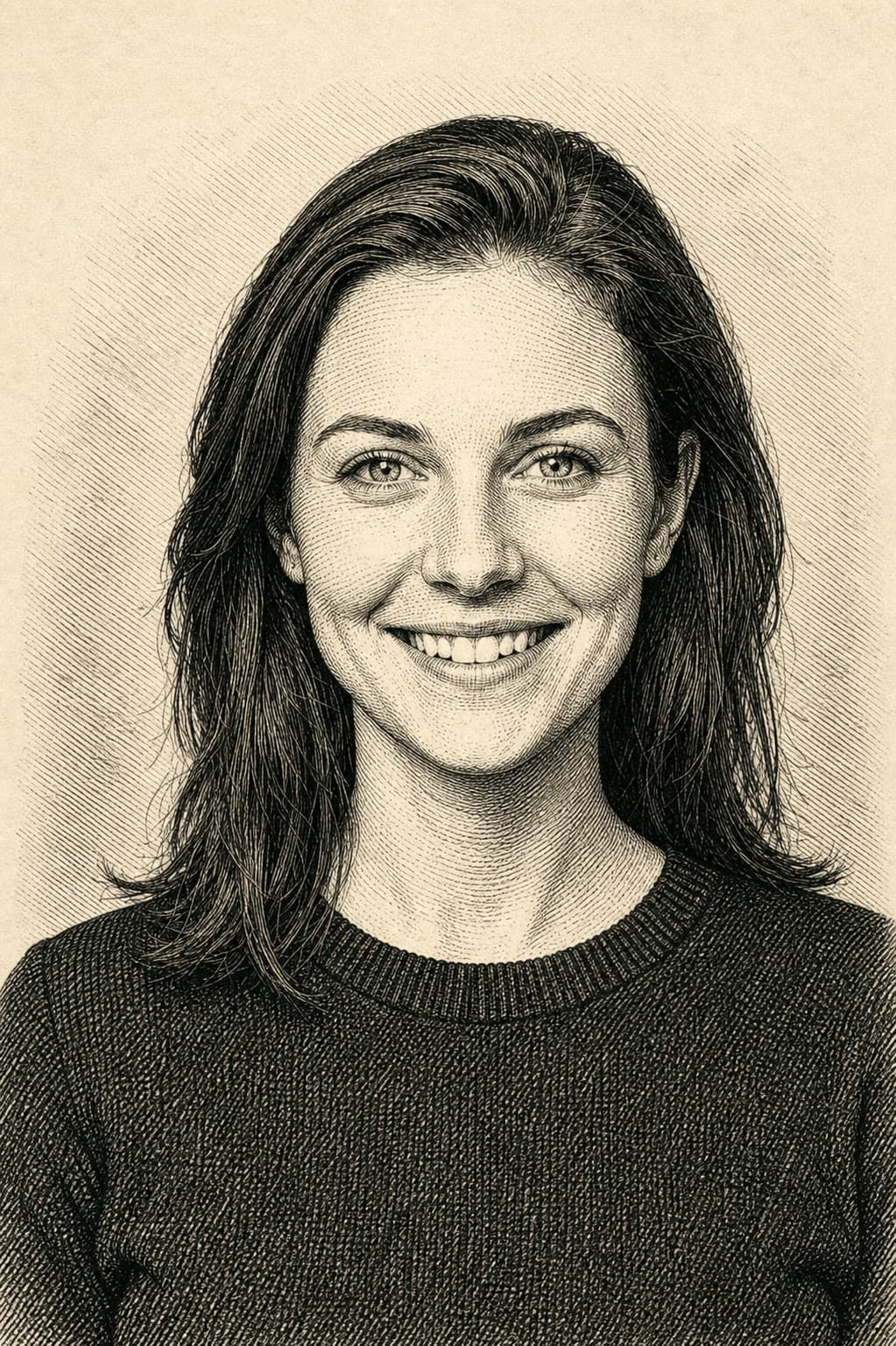
BeforeBefore — Engraving portrait generator wood style: convert uploaded portrait to classic wood engraving crosshatch, preserve likeness.
AfterEngraving portrait generator wood style: convert uploaded portrait to classic wood engraving crosshatch, preserve likeness.

Generator examples

Before & after

Engraving portrait generator — upload, pick a craft, compare

One source portrait, three image-to-image passes. Drag each slider — wood crosshatch, metal stipple, linocut. Upload your photo in the generator above, pick the matching engraving portrait generator preset, and restyle while keeping likeness readable.

Wood engraving

Upload your portrait — crosshatched book-plate look with likeness preserved.

Your photo
Wood engraving
Your photoWood engraving

Instruction used

Convert uploaded portrait to wood engraving crosshatch — preserve likeness, fine parallel lines, warm paper tone.

Best for author busts, family heirlooms, and antique book illustrations. Even side light in the source reads as hatch direction.

Engraving portrait generator wood style: convert uploaded portrait to classic wood engraving crosshatch, preserve likeness, black ink on warm cream paper

Metal plate

Same photo — stipple and burin texture with currency-style gravitas.

Your photo
Metal plate
Your photoMetal plate

Instruction used

Convert uploaded portrait to metal plate stipple engraving — preserve likeness, dense dot shading, oval medallion feel.

Use for founder plaques, wedding medallions, and banknote homage comps. Verify any date line at full size.

Engraving portrait generator metal plate style: convert uploaded portrait to stipple metal engraving, preserve likeness, silver-toned medallion

Linocut

Same photo — bold carved edges for posters and social avatars.

Your photo
Linocut print
Your photoLinocut print

Instruction used

Convert uploaded portrait to bold linocut print — preserve likeness, high contrast, limited two-color palette.

Works for band posters, podcast art, and tattoo flash directions. High contrast sources convert cleanest.

Engraving portrait generator linocut style: convert uploaded portrait to bold linocut carved edges, preserve likeness, graphic poster feel

Tip: click a slider, then use arrow keys for fine control. High-contrast portraits with even side light convert to hatch lines most cleanly.

Pet portrait — linocut engraving portrait generator

Upload a pet photo, pick linocut, keep fur contrast high. Same likeness rules as human portraits.

Photo
Linocut
PhotoLinocut

Author bust — wood engraving portrait generator

Same source portrait restyled as a book-plate wood engraving. Verify likeness at 100% zoom.

Photo
Wood engraving
PhotoWood engraving

Words that sell the engraving portrait generator look

Name technique, not filter — the engraving portrait generator needs craft vocabulary on your uploaded photo.

Crosshatch

Parallel lines that build tone — core wood engraving portrait generator shading.

Stipple

Dot fields for metal plate engraving portrait generator currency gravitas.

Linocut cut

Bold carved edges — engraving portrait generator poster mode with limited colors.

01Upload a clear portrait before picking wood, metal, or linocut preset.

02One craft per render — wood, metal, or linocut engraving portrait generator preset only.

03Quote short engraved text and verify every letter at full size.

04Output is concept art — vector trace separately for physical plates.

14 engraving portrait generator ideas

Each line pairs an upload with an engraving portrait generator craft. Pick the preset, paste optional notes, verify any engraved text at full size.

  • Upload profile photo — wood engraving preset, scholar bust with crosshatch shading.

  • Upload pet portrait — linocut preset, bold carved edges on fur contrast.

  • Upload couple photo — metal plate preset, medallion with date line to verify.

  • Upload author headshot — wood engraving for a classic reprint jacket.

  • Upload founder photo — metal plate oval with short motto, verify spelling.

  • Upload band photo — linocut singer silhouette, two-color gig poster.

  • Upload historical reference — wood engraving statesman profile, antique paper tone.

  • Upload tattoo reference — linocut skull and roses, graphic style.

  • Upload formal portrait — metal plate stipple in banknote border frame.

  • Upload family photo — wood engraving grandmother profile, fine hatch shadows.

  • Upload sports photo — linocut athlete portrait, high contrast poster.

  • Upload logo photo — metal plate circular mark with short engraved tagline.

  • Upload character art — wood engraving fantasy bust, book illustration look.

  • Upload podcast headshot — linocut host bust, social avatar loop.

From engraving-style proof to physical production

The top results show strong banknote and crosshatch examples. Voor extends the workflow through likeness review and a truthful raster-to-production handoff.

  1. SOURCE

    Choose directional light

    Side-lit profiles and three-quarter portraits create clearer hatch direction than flat beauty lighting.

  2. STYLE

    Name one craft

    Use wood crosshatch, metal stipple, or linocut in one render instead of mixing incompatible mark systems.

  3. PROOF

    Approve likeness at full size

    Compare the proof beside the source and check eyes, mouth, hairline, and any short motto before sign-off.

  4. HANDOFF

    Vectorize for production

    The result is raster concept art. Trace final lines and typeset text separately for CNC, letterpress, or metal work.

Evidence notes

Portrait preparation and print handoff

Source-lighting checks, craft-specific prompting, likeness review, and the raster-to-vector handoff keep an engraving concept usable beyond the first render.

Engraving portrait generator — honest limits

The engraving portrait generator is image-to-image: upload your portrait, pick wood, metal, or linocut, and the model restyles while keeping likeness readable. It renders the look of incised lines — hatch density, plate tone, paper tooth — not vector paths or CNC toolpaths.

Name the craft in every prompt: crosshatch, stipple, linocut cut. The tool fails when you ask for a generic “vintage filter” instead of a specific print technique.

Source photo tips: even side light reads as hatch direction; flat on-camera flash flattens planes. Profile and three-quarter angles convert cleaner than straight-on beauty shots with soft fill in an engraving portrait generator pass.

Export at full resolution before adding engraved text in a vector app. Engraving portrait generator concept stills are raster — trace lines you need for CNC or letterpress separately. Run one engraving portrait generator preset per render; mix crafts in post, not in one prompt.

Merch teams use engraving portrait generator output for stamp mockups, wax seal concepts, and book-plate directions before commissioning a human engraver. Zoom every motto line and date — short text fails silently at thumbnail size.

Pet portraits convert well when fur contrast is high in the source. Soft phone flash lowers hatch readability — bump contrast slightly in prep if the engraving portrait generator pass looks muddy.

Short engraved text works on edit models with strong typography — dates, initials, motto lines. Zoom in and verify spelling before print. For thread-on-fabric looks, try AI Embroidery Generator.

Wedding and memorial teams archive engraving portrait generator proofs beside the source photo — clients approve hatch density before you commission a human engraver for metal or letterpress.

Batch holiday cards: lock one engraving portrait generator preset per family, vary only motto text in post — crosshatch direction stays consistent when the source lighting matched across shoots.

Vector handoff: trace lines you need for CNC or letterpress separately — concept stills are raster comps, not toolpaths. Export at full resolution before adding engraved text in a vector app.

Client sign-off: send proof beside the source photo — approve hatch density before you commission a human engraver for metal, wax seal, or letterpress production runs.

Zoom motto lines and dates at print size — short engraved text fails silently when reviewers approve only thumbnail proofs on phone screens.

Engraving portrait generator — FAQ

What does an engraving portrait generator make?

An engraving portrait generator restyles your uploaded portrait into etched art looks — wood engraving crosshatch, metal plate stipple, linocut bold cuts. This page uses image-to-image on Voor AI; output is concept art, not physical plates.

Is the engraving portrait generator output printable?

The engraving portrait generator makes high-resolution stills suitable for posters and merch mockups. For letterpress or CNC plates you still need a vector trace — the engraving portrait generator is the visual concept stage.

Which engraving portrait generator style should I pick?

Wood engraving for fine crosshatch portraits, metal plate for antique currency feel, linocut for bold graphic posters. Each engraving portrait generator preset names the craft in the prompt prefix.

Can the engraving portrait generator use my photo?

Yes — upload a clear portrait in the generator, pick wood, metal, or linocut preset, and the engraving portrait generator restyles it while keeping likeness readable. High-contrast photos convert best to hatch lines.

Which model powers the engraving portrait generator?

This page uses the image-editing collection with Seedream 4.5 by default — swap models in the picker if you need sharper short engraved text on a poster preset.

Is the engraving portrait generator free?

New accounts receive 50 welcome credits. Cost varies by model and resolution, and the generator shows the estimate before you run.

What subjects work best in an engraving portrait generator?

Profiles, busts, pets, historical figures, and logo medallions. The engraving portrait generator simplifies gradients into hatch lines — avoid ultra-soft beauty lighting in the source photo.

Engraving portrait generator vs AI embroidery generator?

Embroidery simulates thread on fabric. The engraving portrait generator simulates ink in grooves — crosshatch, stipple, linocut. Pick the craft that matches your merch.

Can I combine engraving portrait generator styles?

Run one engraving portrait generator preset per render. Mix wood and linocut in post — competing craft names in one prompt confuse the engraving portrait generator.

Engraving portrait generator wedding workflow?

Archive engraving portrait generator proofs beside the source photo — clients approve hatch density before you commission a human engraver for metal or letterpress.

Engraving portrait generator holiday cards?

Lock one engraving portrait generator preset per family, vary motto text in post — crosshatch direction stays consistent when source lighting matched across shoots.

Engraving portrait generator pet portraits?

High fur contrast converts best — soft phone flash lowers hatch readability. Bump contrast slightly in prep if the engraving portrait generator pass looks muddy at thumbnail size before you send proof to the client.

Engraving portrait generator production handoff?

Send engraving portrait generator proof beside the source photo — approve hatch density before commissioning human engraving for metal, wax seal, or letterpress. Vector trace toolpaths separately from the raster concept still.

Engraving portrait generator spelling check?

Zoom motto lines and dates at print size on every engraving portrait generator export — short engraved text fails silently when reviewers approve only phone thumbnails before letterpress runs.

People also search for

  • engraving portrait generator free
  • ai engraved portrait
  • wood engraving portrait ai
  • linocut portrait generator
  • metal plate engraving ai
  • engraving portrait generator from photo
  • vintage engraved portrait maker
  • crosshatch portrait generator

Engraving portrait generator recap: upload portrait, pick wood/metal/linocut preset, verify text, export PNG. Before/after sliders above show the same source photo in three crafts.

Etch your first portrait

Upload your photo, pick wood, metal, or linocut — the engraving portrait generator preset carries the technique vocabulary.

Generate engraved portrait