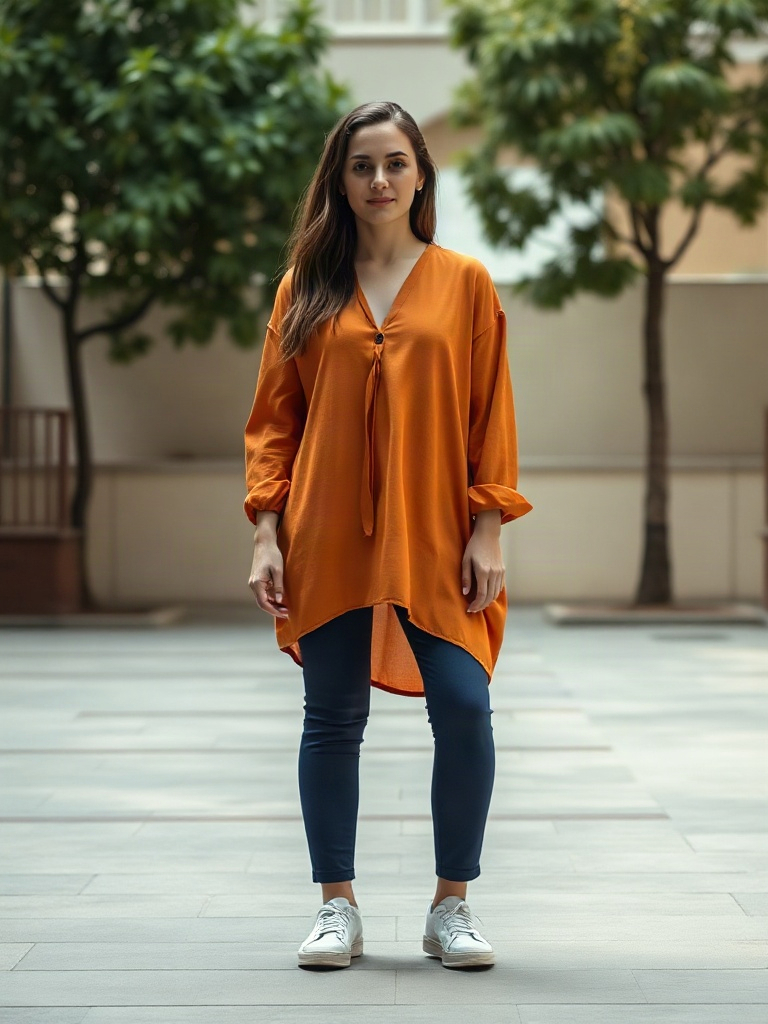
Plan a relaxed Baile Charme-inspired dance with full-body framing and a steady camera. Direct a short phrase and review foot placement before editing to music.

Example Video
Before
Before — baile charme dance — generated workflow demo
After

Generator examples

Generated demo and test notes

baile charme dance — generated workflow demo

MiniMax H3 Max Turbo · 5.184 seconds · 768 × 1024 · Generated Oct 22, 2026 (UTC+8)

The subject alternates small side steps and weight shifts in the courtyard while staying inside the full-body frame.

The clip shows an original relaxed step pattern. It does not certify a culturally exact routine or reproduce a particular dancer. Starting images were generated with FLUX.1 Schnell; this web copy is compressed and silent.

Input, prompt and method

View the fictional AI-generated starting image

The adult dancer from the uploaded full-body image performs a relaxed Baile Charme-inspired side-step phrase in an open evening street-party setting. Preserve the face, outfit and body proportions. Small smooth steps to one side and back, gentle shoulder movement, soft knees, both shoes visible, steady full-body camera. Keep background people distant and separate, no rapid spins, no text or logos.

This clip is AI generated. It is one example, not a success-rate measurement. Model, input, output and editing details are recorded above; no original social-platform soundtrack or template is supplied.

Original prompt recipesEditable workflow

Plan your baile charme dance interpretation

A Baile Charme-inspired scene is carried by relaxed group-dance energy and readable foot placement. For a first AI take, direct one person rather than a dense street party. Keep the dance phrase small, the camera steady and the setting secondary to the movement.

Use authorized inputs• Review the live credit estimate

Three original prompt directions

Choose a model in the generator above, upload your authorized starting frame and paste one original prompt below. Review the displayed credit estimate before generating. These prompts guide a new interpretation; they do not load an official template or guarantee exact choreography.

Evening Side-Step

The adult dancer from the uploaded full-body image performs a relaxed Baile Charme-inspired side-step phrase in an open evening street-party setting. Preserve the face, outfit and body proportions. Small smooth steps to one side and back, gentle shoulder movement, soft knees, both shoes visible, steady full-body camera. Keep background people distant and separate, no rapid spins, no text or logos.

Daylight Courtyard Steps

The adult dancer from the uploaded full-body image performs a relaxed Baile Charme-inspired side-step phrase in an open evening street-party setting. Preserve the face, outfit and body proportions. Small smooth steps to one side and back, gentle shoulder movement, soft knees, both shoes visible, steady full-body camera. Keep background people distant and separate, no rapid spins, no text or logos. Use a spacious daylight courtyard, plain casual clothing and a clear view of both shoes.

Studio Charme Phrase

The adult dancer from the uploaded full-body image performs a relaxed Baile Charme-inspired side-step phrase in an open evening street-party setting. Preserve the face, outfit and body proportions. Small smooth steps to one side and back, gentle shoulder movement, soft knees, both shoes visible, steady full-body camera. Keep background people distant and separate, no rapid spins, no text or logos. Use an uncluttered warm studio instead of a street party, with a steady full-body view and relaxed shoulder motion.

Prepare the starting frame

Use an authorized adult full-body photo with both shoes visible. Avoid wide trousers or objects that completely hide the knees and ankles if the footwork matters.

A simple outdoor party setting can suggest the atmosphere without crowding the dance space. Keep the light consistent so the legs do not disappear into a deep shadow.

Prepare and direct your result

Choose a model in the generator above, upload your authorized starting frame and paste one original prompt below. Review the displayed credit estimate before generating. These prompts guide a new interpretation; they do not load an official template or guarantee exact choreography.

1

Find a relaxed stance

Begin with soft knees and balanced weight rather than a dramatic jump.

2

Move through one phrase

Use a small side step and a gentle return, with shoulders following naturally.

3

Leave an edit point

Finish in a comfortable standing pose to make trimming and music alignment easier.

Review the take before adding music

Check heel and toe placement as the weight shifts. If a shoe smears or the leg length changes, shorten the phrase and use a simpler background rather than adding more dance instructions.

The prompt is an original interpretation of the idea. It does not import a CapCut template or copy a reference performance. A text instruction can guide a gesture, but it cannot guarantee exact choreography or frame-perfect timing. Add only music or other audio you are permitted to use in your publishing app.

Questions about baile charme dance

Is this an exact Baile Charme tutorial?

No. It is a shot-planning and prompt guide for an AI interpretation. For exact steps, use a dance reference you have permission to study.

Does the original music come with it?

No specific original recording is supplied. Add permitted music in the final edit.

Can I animate a whole group?

Start with one clear subject. More dancers increase the chance of merged limbs and inconsistent faces.

Try your own interpretation

Upload your photo, choose the model and paste a prompt. The selected model and its current estimate determine the generation cost.

Image to video AI for turning stills into motion you can ship

Upload a reference frame—product packshot, character turnaround, or location plate—and describe how it should move. Voor AI preserves identity better than text-only runs when faces, logos, or packaging edges must stay stable.

Turn an approved still into motion

Use this when the image already matters: a product shot, portrait, pet photo, character frame, or generated still that should stay recognizable while the camera or subject moves.

Image-to-video motion

Reference-led video keeps composition closer than prompt-only generation.

Photo-to-video workflow

Photo-to-video workflow

Upload a clean source image, then add restrained camera motion.

3D camera movement

3D camera movement

Orbit, dolly, crane, and push-in prompts work best from readable depth.

Product loop

  1. 1Upload packshot
  2. 2Preserve label and shape
  3. 3Ask for slow orbit
  4. 4Review frame-by-frame

Portrait animation

  1. 1Use sharp face photo
  2. 2Keep identity locked
  3. 3Add subtle expression
  4. 4Avoid large camera moves

Generated still to clip

  1. 1Create still first
  2. 2Clean with image edit
  3. 3Animate approved frame
  4. 4Enhance only best take

Product motion

Slow clockwise orbit around the product, label remains sharp, soft studio reflection, no shape changes, clean ending frame.

Portrait motion

Subject breathes subtly, hair moves in a light breeze, eyes stay consistent, background remains still, gentle handheld camera.

Scene motion

Camera pushes through the doorway, warm light flickers, curtains move slightly, no new objects appear.

Best inputs for image to video AI

High-frequency detail can shimmer when motion is synthesized. Start with clean plates: balanced exposure, minimal JPEG artifacts, and subjects centered with a little headroom for camera motion.

If the still has transparency, flatten onto a neutral background before upload so the model infers depth consistently.

Motion prompts that respect physics

Anchor global motion first (“slow crane down”, “gentle handheld sway”), then local motion (“hair reacts to wind from camera-left”). Splitting scales reduces impossible physics glitches.

When animating products, specify contact shadows and tabletop reflections; models otherwise float objects.

Where image to video fits in a marketing stack

E-commerce teams animate SKU stills for PDP loops; growth teams refresh ad creatives without full reshoots; founders prototype pitch narratives before booking production.

Combine with text to video for exploration, then lock hero frames here for brand-consistent motion.

Image to video AI starts with the still image

Image to video AI is strongest when the reference frame already looks like the world you want to animate. A clean product photo, polished character image, or approved campaign still gives the video model fewer identity decisions to invent. If the still has bad lighting, soft edges, or unreadable packaging, fix that first with image to image AI, restoration, or super resolution.

Treat the prompt as motion direction, not a second image prompt. Describe subject movement separately from camera movement: a slow push-in, a gentle orbit, hair moving in wind, fabric reacting to a turn, a product rotating on a table. Image to video AI becomes less chaotic when global motion and local motion are separated.

For brand assets, write what must not change. Product shape, label placement, clothing, face, color, and background can drift if the prompt only asks for cinematic motion. A preserve list gives image to video AI a clearer approval target.

Production uses for image to video AI

Product teams use image to video AI to turn catalog stills into PDP loops and ad variations. Creators use it to animate portraits, pets, illustrations, and character frames. Agencies use it to test motion before booking a shoot. The value is not only speed; it is the ability to test motion ideas while keeping the approved visual identity close to the original still.

A practical workflow is layered: generate or upload the still, improve it if needed, animate with image to video AI, review the clip frame by frame, then enhance or extend only the best take. That sequence saves credits because the expensive motion pass starts from a stronger input.

Related tools matter on this page because image to video AI often depends on text to image, image to image, video enhancement, and app presets. The full horizontal catalog below makes those next steps visible without forcing users back into search.

Preparing a reference frame for motion

A reference frame should already contain the main decisions: subject, crop, lighting, background, style, and visual hierarchy. Leave room for movement at the edges if the camera will push, pan, or orbit. Avoid overly tight crops when the subject needs to move. Clean source images reduce drift because the model can focus on temporal change instead of repairing basic composition.

For products, remove clutter before animation. A simple table, controlled reflection, clear contact shadow, and readable package shape are easier to animate than a busy lifestyle scene with many competing edges. If the goal is an ad loop, restrained motion often looks more premium than dramatic movement.

For portraits and characters, prioritize identity. Use a sharp face, visible clothing, and a pose that supports the intended action. If the face is tiny or partially hidden, the result may drift. If a character must remain consistent across several clips, reuse the same approved still and vary only the motion instruction.

For illustrations and design assets, describe whether the motion should preserve the flat graphic style or introduce cinematic depth. Without that instruction, a model may turn a clean graphic into a pseudo-realistic scene. Clear style preservation keeps brand assets, icons, and mascots closer to the original art direction.

After generation, review the clip with the source still beside it. The best output is not the one with the most movement; it is the one that keeps the important parts stable while adding enough motion for the placement. That distinction matters for product ads, creator content, pitch videos, and social loops.

Controlling motion from an approved still

Image to video AI should preserve the reason the still was approved. If the image works because of a face, product label, pose, lighting setup, or graphic style, write that preservation requirement into the prompt. Motion is valuable only when it strengthens the asset instead of replacing the visual identity.

Use motion scale carefully. A locked product shot might need a small push-in or turntable feel. A character portrait might need breathing, hair movement, or a subtle expression change. A fantasy scene might handle stronger camera travel. Matching motion intensity to the use case makes the output look intentional rather than randomly animated.

If the clip fails, diagnose the source before changing models. A blurry reference, tight crop, noisy background, or confusing pose can cause instability across many tools. Fixing the still often improves image to video AI more than rewriting the motion prompt ten times.

For ecommerce, build variants around one approved source: slow reveal, soft light sweep, lifestyle camera sway, and clean product loop. This gives a paid-media team different creative angles while keeping the product consistent. For creators, the same method works with portraits, pets, artwork, and illustrated characters.

Image to video AI pairs naturally with enhancement and extension tools. Keep only the best motion take, then improve resolution or continue the ending if the clip needs more time. This layered approach is more reliable than asking one generation to solve reference quality, motion, duration, and polish in a single pass.

Handoff rules for still-to-motion projects

Before sending a clip to an editor or client, save the source still, prompt, model, ratio, duration, and selected output together. That context makes future revisions faster. If the client asks for the same product with slower motion, the team can reuse the approved source instead of rebuilding the whole scene.

Image to video AI should also be reviewed against placement. A marketplace loop needs a stable product and a clean ending. A creator clip can accept more personality. A launch teaser may need a more cinematic move. The right motion style depends on where the video will live, not only on what looks impressive in the preview panel.

Use batch thinking when building campaigns. Create one approved still, then generate several motion directions: slow push, gentle orbit, lifestyle sway, detail reveal, and clean loop. Comparing those versions gives the team motion options while preserving the same visual foundation.

If a video output changes the product, face, logo, or key background too much, return to the still. Tighten the crop, simplify the scene, or add stronger preserve language. A better source image often solves issues that repeated animation attempts cannot fix.

The full related catalog below is part of this handoff. Users can jump back to image editing, forward to video enhancement, sideways to text exploration, or into app presets without leaving the production path.

FAQ

Will faces stay recognizable?
High-quality frontal references work best. Profile or heavily occluded faces may drift—reduce motion strength or switch models if identity collapses.
Can I loop outputs for social?
Trim in your editor to seamless in/out points. Many models add subtle non-periodic motion; a short cross-dissolve at the loop seam hides discontinuities.
What should I do if colors shift?
Match color space expectations (sRGB stills) and avoid heavy LUTs before upload. If drift persists, lower stylization words in the prompt.