PixVerse V6: 1–15 second clips up to 1080p from text, a still, two keyframes, or a clip to extend.
Generator examples

PixVerse · V6 · tested on Voor
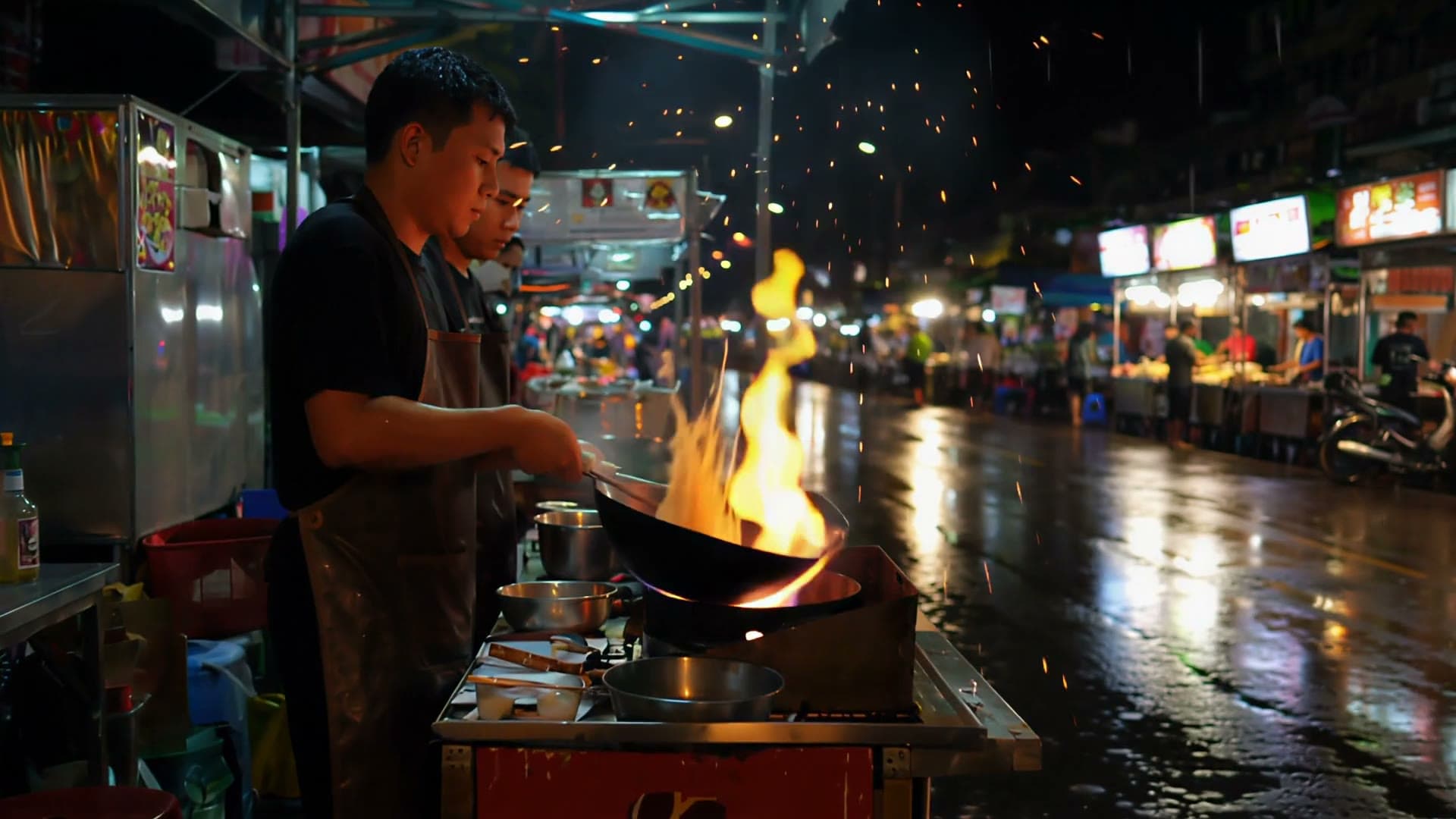
PixVerse V6, tested on a rainy night market
PixVerse V6, released by PixVerse in March 2026, renders 1 to 15 seconds at up to 1080p, with optional sound. Every clip on this page is a real PixVerse V6 output, made with the settings in the generator above.
Flames, sparks, and wet-street reflections hold up at 1080p. We asked for one cook and got two; the noodles stay hidden in the wok.
Read the exact prompt
Night market noodle stall in the rain. A cook in a dark apron tosses noodles in a flaming wok; flames leap up, steam and sparks rise into the wet air, neon light reflects in puddles on the pavement. Slow dolly-in from across the street, shallow depth of field. Sound: wok sizzle, rain on a canvas awning, distant street chatter. No signs, no text.
- 1–15 s
- Any whole second
- 1080p
- Top of four resolution tiers
- 8 shapes
- From 21:9 to 9:16
- 4 modes
- Text, image, transition, extend
Frame shape
PixVerse V6 frames eight shapes
Text to video and transition take an aspect ratio; image to video and extend keep the shape of your upload. Filled shapes show the pixel size we got back.
- 21:91280 × 560
- 16:91920 × 1080
- 3:2not tested
- 4:31024 × 768
- 1:1960 × 960
- 3:4not tested
- 2:3not tested
- 9:16720 × 1280
In 9:16 the descent, bubbles, and fish all read clearly. Around 2.5 seconds the diver's arms go soft mid-stroke.
Multi-clip switch
One PixVerse V6 prompt, three camera setups
With multi-clip on, PixVerse V6 cuts between angles inside one file. Our three numbered shots came back in order as hard cuts; the model chose the timing. Click a shot to jump to it.
21:9 · 720p · 8 s · audio on · multi-clip on · 168 credits
Read the exact prompt
A lone cyclist climbs a coastal mountain road at dawn. Shot 1: wide establishing view of the switchbacks above a calm sea. Shot 2: close-up of the spinning front wheel and pedals. Shot 3: over-the-shoulder view as the rider reaches the crest and the sun breaks over the horizon. Sound: wind, freewheel ticking, steady breathing.
Image to video
Start PixVerse V6 from a still

Your upload becomes frame one, and a square still comes back square. Describe only what changes.
The fox stands, shakes, and walks off — to the left, though we asked for the right.
Image to video · square still · 720p · 5 s · audio on · 105 credits
Other photo-animation models sit on image to video.
Transition · first and last frame
PixVerse V6 transition: summer to winter
Transition renders the path between two keyframes. Our winter frame is an edit of the summer one; the closer the frames match, the less PixVerse V6 invents. Drag the slider to step through it.


Leaves turn gold, snow takes over, and the clip lands on the winter frame. Mid-clip, the falling leaves look like flat confetti.
Transition · 16:9 · 720p · 5 s · audio on · 105 credits
Read the exact prompt
Seasonal time-lapse from a locked-off tripod: the summer afternoon fades, birch leaves turn gold and fall, clouds race across the sky, snow begins to fall and settles on the roof, rocks and jetty until it is a snowy blue-hour evening and the cabin window lights up. Camera does not move. Sound: wind building, then soft snowfall.
Extend
PixVerse V6 extend keeps the take you have
Extend continues the end of your clip. The five-second fox clip came back as one 10.2-second file: the original, then five new seconds. Credits count only the seconds you add.
The camera swings to find the fox, follows it to a birch, and holds as it looks back — the beat we asked for.
Extend · 720p · 5 s added · audio on · 105 credits
Read the exact prompt
The fox keeps trotting through the birch forest, stops beside a birch trunk, looks back over its shoulder toward the camera, then walks on into the falling snow. Camera stays at the fox's eye level. Sound: soft crunch of snow, quiet wind.
Other continuation models are on the AI video extender.
Style presets
PixVerse V6 style presets nudge, not repaint
Same prompt and seed, 4:3, 540p, five seconds, 61 credits each. No preset produced drawn anime or a clay-model look, so judge them at low resolution first.
Read the exact prompt
A small round robot waters a sunflower in a rooftop garden at sunset, city skyline behind it, gentle camera orbit around the robot.
PixVerse V6 vs PixVerse 5.6
What changed since PixVerse 5.6
Settings as they run on Voor; we did not run a matched quality test. PixVerse 5.6 stays in the text to video picker.
Credits
Estimate a PixVerse V6 render
Resolution × audio × seconds, the same in every mode. The generator confirms the figure before you spend.
79credits · 720p · 5 s · audio off
Prompting
Four lines that worked in our PixVerse V6 tests
- 01
One subject, one action
Four actions in five seconds gave a rushed shake and a wrong-way exit.
- 02
One camera move
“Camera does not move” kept the cabin pinned while the season changed around it.
- 03
Sound, then the switch
Name the sounds, then switch audio on; it starts off.
- 04
Shots or keyframes
Number shots for multi-clip; for transition, describe the change.
PixVerse V6 FAQ
What is PixVerse V6?
PixVerse V6 is PixVerse's March 2026 video model. On Voor it runs text to video, image to video, transition, and extend: 1 to 15 seconds at up to 1080p, with optional audio.
How is PixVerse V6 different from PixVerse 5.6?
On Voor, PixVerse 5.6 makes 5, 8, or 10 second clips in three shapes. PixVerse V6 takes 1 to 15 seconds in eight shapes, adds multi-clip, style presets, transition, and extend, and costs fewer credits.
How much does PixVerse V6 cost on Voor AI?
It is priced per second by resolution and audio. One silent second at 360p is 9 credits; five seconds at 720p is 79 silent or 105 with audio; fifteen seconds at 1080p with audio is 601. New accounts get free welcome credits.
How long can a PixVerse V6 video be?
Any whole number of seconds from 1 to 15. Extend adds another 1 to 15 seconds to a clip you upload.
Does PixVerse V6 generate audio?
Yes, when you switch audio on. It is off by default and raises the per-second price. Name the sounds you want in the prompt.
What does the PixVerse V6 multi-clip switch do?
It lets PixVerse V6 cut between camera angles inside one clip. Our three numbered shots came back in order; the model, not you, sets each shot's length.
How does the PixVerse V6 first and last frame transition work?
Upload a first and a last frame and describe the change. PixVerse V6 renders the motion between them and ends on your last frame.
Can PixVerse V6 extend an existing video?
Yes. Upload a clip, describe what happens next, and choose how many seconds to add. You get one file with both parts.
Which aspect ratios and resolutions does PixVerse V6 support?
Text to video and transition accept eight aspect ratios from 21:9 to 9:16; image to video and extend follow your upload. Every mode offers 360p, 540p, 720p, and 1080p.
Make your first PixVerse V6 clip
Start at 720p, five seconds, one action. Add audio or multi-clip once the shot works.
Create with PixVerse V6