Turn a full-body portrait into a short, rhythmic hip-shake dance clip while keeping identity, clothing, and background recognizable. If you searched for Hippie Shake AI, this is the same photo-to-dance workflow.

Generator examples

One full-body photo in, a hip-shake clip out
Made with this AI Hip Shake workflow: the portrait on the left was the only input — Seedance 1.5 Pro added a lively side-to-side hip-shake rhythm while keeping identity, outfit and the studio floor line intact.
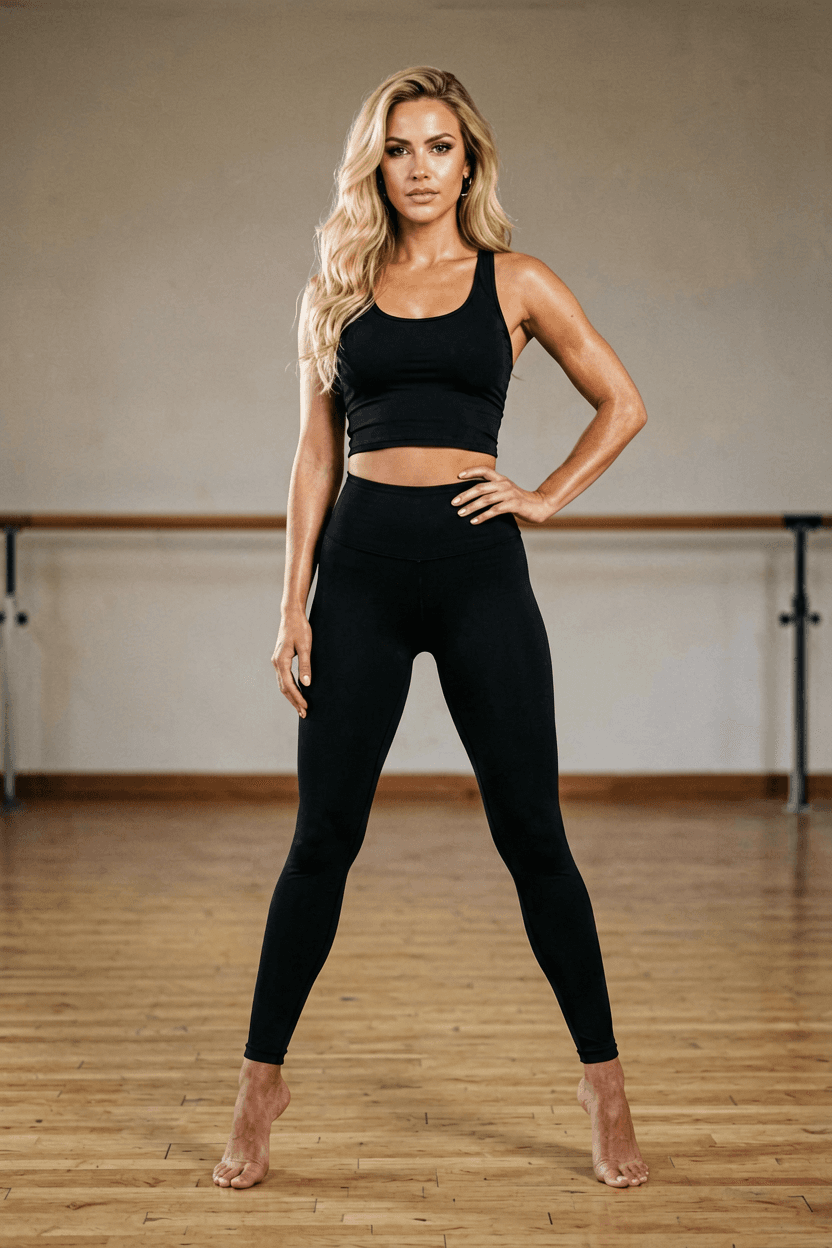
Need a different dance move? AI Baby Dance and Image to Video cover other motion presets on the same upload-and-roll loop.
1 photo
all AI Hip Shake needs to start
2–5s
the clip length AI Hip Shake targets
Face kept
AI Hip Shake preserves identity
50 welcome credits
for new accounts
How AI Hip Shake works
Three steps — AI Hip Shake adds the rhythm, your photo stays the anchor.
01
Upload a full-body photo
Feet visible, clear floor line, front-facing. AI Hip Shake animates exactly this subject.
02
Pick a hip-shake preset
Each preset carries rhythm, planted feet and camera language — you add one human detail if needed.
03
Generate and compare
Roll two or three AI Hip Shake takes and keep the one where the face and clothing stay most stable.
01 Give AI Hip Shake a full-body photo with visible feet — the model anchors on floor contact.
02 Request one side-to-side rhythm and a static camera before adding orbit or zoom.
03 Roll AI Hip Shake three times and keep the take where the face stays most stable.
04 Label every AI Hip Shake clip as AI when the subject is a real person.
12 AI Hip Shake clips to try
One clear photo, one named rhythm. Each line is a ready AI Hip Shake starting point.
- 01
AI Hip Shake TikTok trend cover — match a viral side-to-side move people already know.
- 02
AI Hip Shake stage loop — concert lights, stronger style, short shareable clip.
- 03
AI Hip Shake fitness reel — athletic wear, subtle rhythm, static camera.
- 04
AI Hip Shake cosplay edition — costume preserved, motion stays tasteful.
- 05
AI Hip Shake duo cut — animate each portrait, edit side by side.
- 06
AI Hip Shake festival post — neon backdrop, one rhythm, three rolls.
- 07
AI Hip Shake vertical Reels — 9:16 crop after generation.
- 08
AI Hip Shake subtle motion — cropped portrait, hips only.
- 09
AI Hip Shake avatar art — stylized subject, same physics language.
- 10
AI Hip Shake loop test — opening pose returns near the end.
- 11
AI Hip Shake before/after — still next to clip for skeptics.
- 12
AI Hip Shake slow build — shy sway that breaks into confident rhythm.
12 ways people run AI Hip Shake
Same upload-preset-roll loop — each line points at a different post format or subject.

AI Hip Shake for TikTok — full-body streetwear, clean studio, side-to-side rhythm preset.

AI Hip Shake for stage clips — concert lights, stronger visual style, planted feet.

AI Hip Shake for fitness creators — athletic wear, neutral background, subtle loop.

AI Hip Shake for dance covers — copy a trending move with one quoted constraint.

AI Hip Shake for cosplay — costume preserved, motion stays tasteful and short.

AI Hip Shake for duo posts — animate each portrait separately, cut into a side-by-side.

AI Hip Shake for vertical Reels — 9:16 crop after generation, static camera first.

AI Hip Shake for subtle motion — cropped portrait, hips only, minimal choreography.

AI Hip Shake for festival content — neon backdrop, one rhythm, three rolls.

AI Hip Shake for avatar art — stylized subject, keep the same physics language.

AI Hip Shake for loop tests — opening pose returns near the end for seamless replay.

AI Hip Shake for before/after posts — show the still next to the clip for skeptics.
Getting a clean AI Hip Shake clip
Do
- Give AI Hip Shake a full-body photo with visible feet and a clear floor line.
- Keep the camera static on the first AI Hip Shake pass — add motion only after a clean take.
- Request one side-to-side rhythm instead of long choreography.
- Roll AI Hip Shake three times and compare face stability before publishing.
Don't
- Do not use a tight headshot for AI Hip Shake — hidden legs must be invented.
- Do not add orbit and zoom while the body dances — warping risk rises fast.
- Do not publish AI Hip Shake clips of real people without consent and disclosure.
- Do not accept hand or foot smear — simplify the pose and reroll.
AI Hip Shake FAQ
What source photo works best for AI Hip Shake?
AI Hip Shake works best with one full-body subject, visible feet, a clear floor line, and enough space around the hips and arms.
How should I describe the movement for AI Hip Shake?
For AI Hip Shake, request one side-to-side rhythm, planted feet, stable clothing, and a short loop instead of a long choreography.
Can I use a cropped portrait for AI Hip Shake?
AI Hip Shake can animate a cropped portrait, but the motion should stay subtle because hidden legs and floor contact must be invented.
Why do hands or feet distort for AI Hip Shake?
AI Hip Shake may distort hands or feet when they overlap the body, leave the frame, or move too quickly. A simpler pose reduces that risk.
How do I keep the face recognizable for AI Hip Shake?
Tell AI Hip Shake to preserve facial identity, hairstyle, and expression, then reject versions where the head shape drifts.
Can the result loop smoothly for AI Hip Shake?
AI Hip Shake loops better when the final pose returns close to the opening stance and the camera remains fixed.
Should I add camera motion for AI Hip Shake?
Test AI Hip Shake with a static camera first. Adding an orbit or zoom while the body dances creates more opportunities for warping.
How many versions should I generate for AI Hip Shake?
Generate several AI Hip Shake takes and compare body balance, face stability, clothing, and background before choosing one.
Can I publish the generated clip for AI Hip Shake?
Review AI Hip Shake output for consent, rights, visual errors, and platform rules before publishing a clip featuring a real person.
People also search for
- hippie shake ai
- ai hip shake generator free
- ai hip shake dance video
- ai hip shake from photo
- ai hip shake tiktok
- ai hip shake app
- ai hip shake online
- best ai hip shake generator
- ai hip shake no watermark
Every AI Hip Shake search above resolves to the same workflow: one full-body photo, a preset that carries the rhythm, three rolls, keep the stable take.
Your privacy, your choice
Optional cookies help us understand usage and measure ads. Essential cookies stay on so Voor works.