Upload a portrait and ask for a slightly slimmer jawline in plain words — face slimming ai re-renders the contour while skin texture and identity stay intact.
Drag it yourself — a real face slimming AI pass
The pair below is an actual edit from this page's generator: same woman, same window light — full cheeks and a soft double chin in, a roughly twenty percent slimmer contour out. Drag the divider — the good version of face slimming ai is the one you have to hunt for.
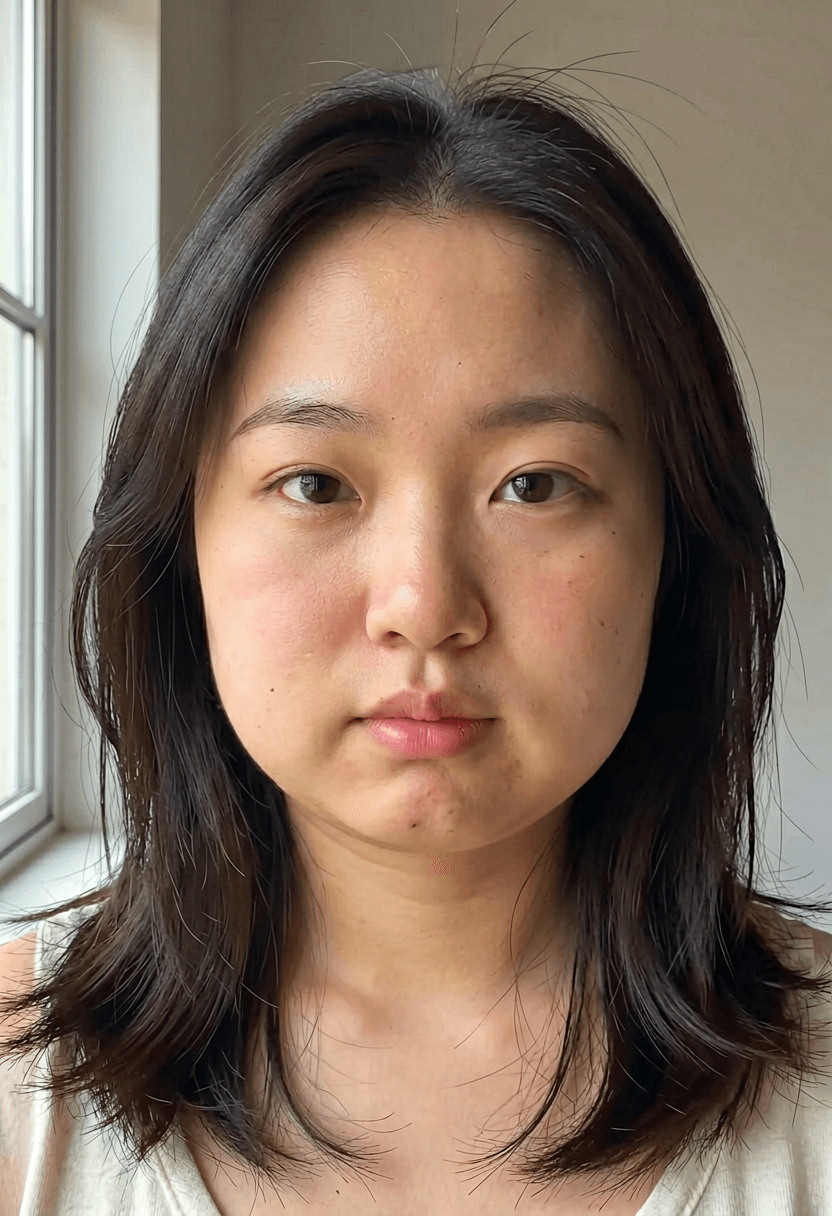
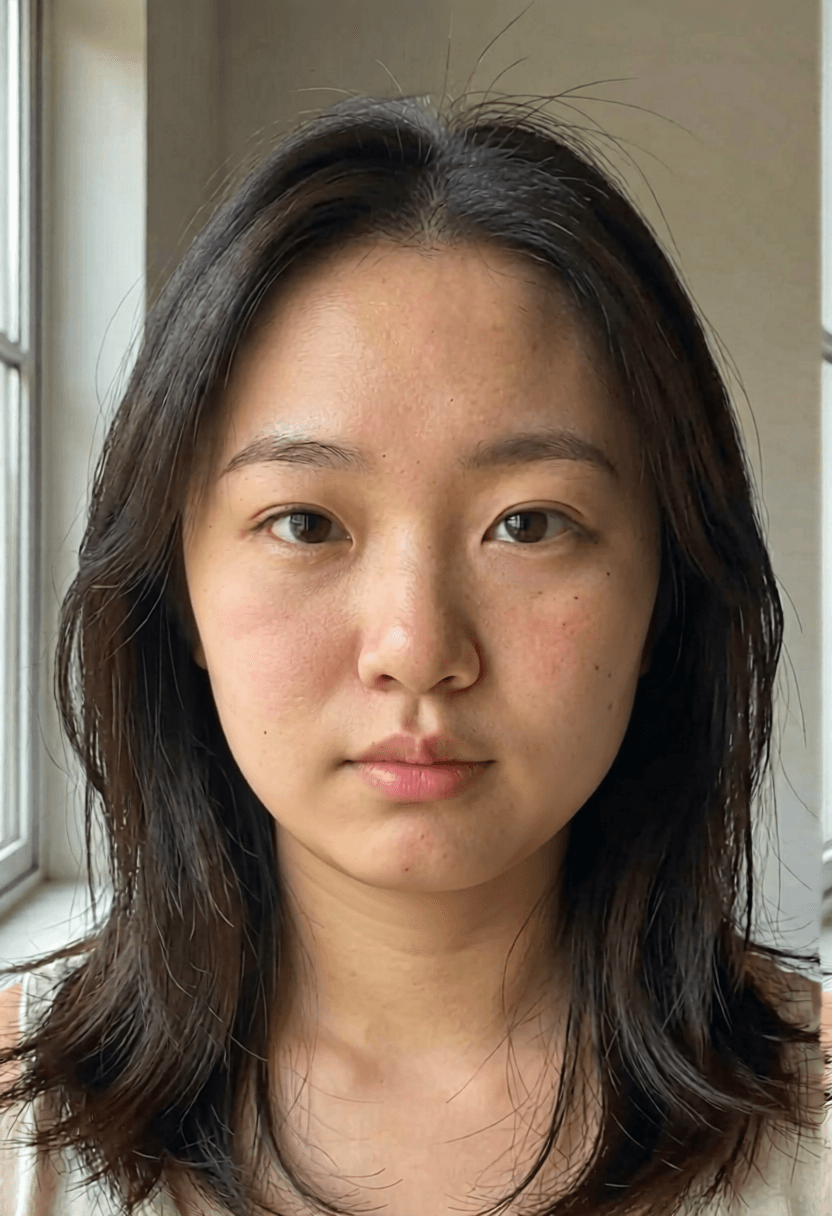
The exact instruction used
Slim the jawline, reduce cheek fullness and soften the double chin by about 20 percent. Keep skin texture, pores, hair, expression, lighting and background exactly identical — I must stay clearly recognizable as the same person.
Three things make this instruction work: a percentage anchors the strength, the "keep" list protects texture and identity, and the last clause states the failure condition out loud. Reuse it verbatim in the generator above — just upload your own portrait.
Default model here is Seedream 4.5 — the strongest identity preservation we host for portrait work. If the output ever reads as a different person, the face slimming ai pass failed: halve the percentage and rerun.
01 Give face slimming ai a sharp, front-lit portrait — it can only refine structure it can see.
02 Anchor every face slimming ai request with a percentage; adjectives drift, numbers don't.
03 List the keeps — texture, hair, expression — in each face slimming ai instruction.
04 If a face slimming ai result reads as a different person, the edit failed: halve and rerun.
Pick a strength like a retoucher, not a filter
Face slimming ai is a dial, not a switch — and the dial is a sentence. These three settings cover nearly every real request:
~10%
Subtle
The version nobody can explain. Right for profile photos that already look like you on a good day.
~20%
Moderate
The demo above — visible side by side because the starting face was genuinely full, natural alone. The practical ceiling for photos other people will see.
Lens fix
Distortion only
Ask for “correct wide-angle lens distortion” instead of slimming. Arm's-length selfies genuinely widen faces; this just undoes the optics.
12 ways people actually use face slimming AI
Every line is the same workflow — upload, state the strength, compare honestly — pointed at a different real situation.
- Face slimming ai for the LinkedIn headshot — ten percent, lens correction first, nobody can tell.
- Face slimming ai for dating profiles — match the photo to how you look in a mirror, not a wide lens.
- Face slimming ai for creators — keep thumbnails consistent with your on-camera look across platforms.
- Face slimming ai for photographers — deliver light retouches without a Photoshop round-trip.
- Face slimming ai for old favorites — fix the one great photo ruined by an arm's-length front camera.
- Face slimming ai for event photos — crop your face from the group shot, edit, recompose.
- Face slimming ai for avatar sets — regenerate every crop with the same instruction for a uniform look.
- Face slimming ai for the passport-photo effect — undo the harsh overhead light era of your documents.
- Face slimming ai as lens correction only — no slimming, just optics, the most defensible edit there is.
- Face slimming ai before image-to-video — retouch the keyframe once, animate it after.
- Face slimming ai for couples' photos — one face at a time, same strength both, keep it fair.
- Face slimming ai with a strength ladder — run 10 and 15 percent, pick blind, trust your first pick.
What face slimming AI is — and isn't
It's photo styling, in the same category as good lighting and a flattering focal length — not feedback about a face. The liquify era failed because warping pixels bent doorframes and smeared ears; face slimming ai regenerates the contour as geometry, so backgrounds stay straight and stubble stays sharp. That's the whole technical story, and it's why the failure mode is gentle: worst case, an edit reads slightly too strong and one reroll with softer wording fixes it.
The honest caveat: photographers reach for face slimming ai to deliver light retouches without a Photoshop round-trip, creators use it to match thumbnails to their on-camera look — and if editing your own face ever stops feeling like styling and starts feeling like a verdict, close the tab. The tool will still be here; it's not owed anything.
Face slimming AI — FAQ
Will face slimming ai still look like me?
That's the design goal — face slimming ai changes the contour, not the identity. If the result drifts toward a different person, halve the requested strength and reroll.
Why do phone selfies widen my face in the first place?
Wide lenses at arm's length exaggerate near features — it's lens distortion, not your face. Part of what a face slimming ai pass corrects is simply that optical effect.
Does face slimming ai work on group photos?
One face at a time is far more reliable: crop, run the face slimming ai edit, recompose. Whole-group passes tend to touch faces you didn't ask about.
Can face slimming ai edit video?
This page edits stills. For motion, retouch a keyframe with face slimming ai here and animate it with the image-to-video tools.
What strength should a face slimming ai edit use?
Ten percent for photos that already look like you on a good day; twenty for the visible-side-by-side ceiling (the demo pair above); or skip slimming entirely and ask face slimming ai to correct wide-angle distortion only.
Why does face slimming ai beat the old liquify tools?
Liquify warps pixels — bent doorframes and smeared ears were the tell. Face slimming ai regenerates the contour as geometry, so backgrounds stay straight and stubble stays sharp.
Which model runs the face slimming ai edit here?
Seedream 4.5 by default — the strongest identity preservation we host for portrait work. Same instruction, your photo, the demo prompt verbatim.
Is my photo used for training?
Uploads are processed to produce your face slimming ai edit and handled under our privacy policy — they're your photos, not training data.
What does a face slimming ai pass cost?
Each edit consumes credits by model; new accounts get free daily credits — enough for several takes and an honest comparison.
People also search for
- face slimming ai free
- face slimming ai online
- face slimming ai app
- face slimming ai no filter look
- best face slimming ai
- face slimming ai before after
Each of those searches wants the same three things this page demos: a face slimming ai pass that keeps identity, a strength you control in plain words, and an honest before/after you can drag yourself. Same instruction, your portrait, free daily credits — and if the output ever stops looking like you, the fix is always softer wording, never a stronger filter.
Try a ten-percent pass on your best photo
Upload, paste the instruction, compare honestly at full size. Good face slimming ai output just looks like you — on a great day.
Retouch a portrait