Upload a drawing, pick a style-locked motion preset, and draw to video returns an MP4 that moves in your own visual handwriting.
Every preset starts with the style lock — your lines, colors and paper texture survive the animation.
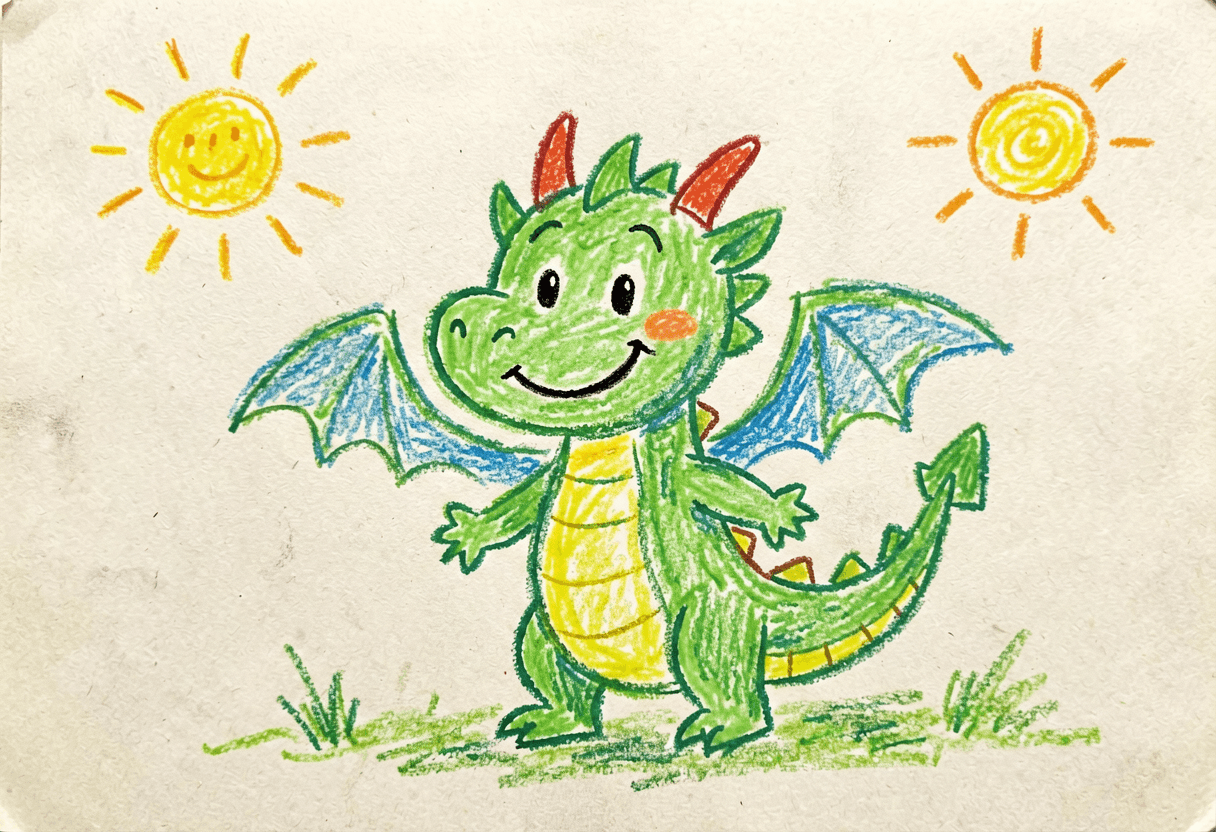
The crayon dragon, before and after one sentence
This is the whole draw to video promise in one pair: the left image is a kid-style crayon drawing; the right is the clip it became. Same wobbly lines, same paper grain — the model animated inside the drawing's style instead of repainting it.
The exact prompt — note the style lock up front
Keep the original drawing style, line quality, colors and paper texture exactly. The crayon dragon flaps its small wings twice and breathes a tiny puff of smoke, the sun wiggles slightly; gentle bouncy children's-book motion, static camera
01 Photograph flat and even before any draw to video run — clean plates keep lines stable.
02 Give draw to video one concrete action, not a scene description.
03 Never drop the style lock — it's why draw to video output still looks like your hand.
04 Roll draw to video twice; keep the take that feels like your drawing moving.
Three groups run draw to video daily
Refrigerator art, animated
The most joyful draw to video use case by a mile: the crayon cat blinks and pounces, and the reaction video becomes a family heirloom. The motion presets above default to soft, bouncy movement that matches the medium.
Storyboards that pitch themselves
Directors animate board frames to test pacing before money is spent. An animatic with real camera-move language beats clicking through stills in every meeting — and it's generated between agenda items.
Illustrators, still recognizably you
Turn finished pieces into loops for Reels without learning After Effects. The line style staying yours is the entire value: followers recognize the hand — now it moves.
12 draw to video projects worth the credits
Every one is a single drawing, a preset and one sentence of motion in the generator above. None of them needs animation skills — that is the entire draw to video proposition: the medium stays whatever you drew with, the motion stays small and believable, and the five-second length keeps each idea cheap enough to try on a whim.
- Draw to video the fridge masterpiece — the crayon cat blinks, the artist (age 6) loses their mind.
- Draw to video your storyboard frames — pacing decisions made with moving boards, in the meeting.
- Draw to video a birthday doodle — sketch the friend, animate a wave, send instead of a card.
- Draw to video the band poster — ink art with drifting smoke as the tour announcement.
- Draw to video a recipe doodle — the pan shakes, the steam curls, the caption sells the dish.
- Draw to video your D&D party sketch — each hero gets a five-second idle animation.
- Draw to video the classroom whiteboard — the diagram assembles itself for the recap post.
- Draw to video a kid's monster — gentle bounce preset, nothing scary, maximum giggles.
- Draw to video your webcomic panel — one action per panel, cut together, weekly format unlocked.
- Draw to video the wedding card sketch — the couple doodle sways; the reception screen loops it.
- Draw to video a product napkin sketch — the mechanism articulates before engineering sees it.
- Draw to video your tattoo flash — the swallow flaps once; the booking DMs follow.
The craft of draw to video in four sentences
Capture the drawing flat and evenly lit, because clean plates keep lines stable in motion. Prompt one concrete action, not a scene — “the knight raises his sword and the flag ripples” beats a paragraph. Protect the style explicitly every time; the presets above prepend that lock so you can't forget it. Roll two takes and keep the one that feels like your drawing moving, not a different artist's.
Why it matters more than it looks: frame-by-frame animation is a skill cliff that stopped almost everyone, and draw to video collapses it to a sentence — which means the people with the most charming source material, kids and sketchbook hobbyists, finally get to see their work move. Fine cross-hatching can shimmer between frames and text inside drawings may wobble; both calm down at lower motion strength.
Draw to video — FAQ
Will draw to video redraw my art in an 'AI style'?
Not if you lock it. Every draw to video preset on this page starts with “keep the original drawing style, line quality, colors and paper texture exactly” — style drift without that line is the most common complaint.
Does draw to video work with photos of paper drawings?
Phone photos work well if the page is flat and evenly lit. Crop to the artwork before uploading — shadows across the paper confuse motion tracking.
Can draw to video animate a whole comic page?
Panel by panel — one action per draw to video generation — then cut the panels together. Whole-page passes muddy the motion.
How long are draw to video clips?
About five seconds per generation. Chain generations or use the AI Video Extender for longer pieces.
Who owns the draw to video result?
Your drawing in, your clip out — draw to video output from your own original artwork is yours to post and use.
Which draw to video preset should I pick?
Gentle bounce for kids' art and mascots, wind & flutter for landscapes and flags, come-alive loop for ambient posts. All three carry the style lock; custom drops it.
Why does fine cross-hatching shimmer in draw to video output?
Dense parallel lines are the hardest texture to keep stable between frames. Lower the motion strength or simplify the shading — both calm it down.
Can draw to video handle digital art and whiteboards?
Yes — digital sketches, whiteboard frames, ink and watercolor all animate. The draw to video style lock matters most for the rough mediums.
What does a draw to video run cost?
Each clip consumes credits by model and length; new accounts get free daily credits — enough for the two-takes-keep-one habit.
People also search for
- draw to video ai free
- draw to video online
- draw to video app
- draw to video ai generator
- kids drawing draw to video
- draw to video anime style
- best draw to video ai
- draw to video from sketch
- draw to video no watermark
Same answer for every variant: the draw to video generator above, with style-locked presets so the clip still looks like your hand. Photograph the drawing flat, pick a motion, roll twice — free daily credits cover the session.
Make a drawing move today
Pick the sketch you're fondest of, photograph it flat, choose a motion preset. Draw to video keeps the hand that drew it visible — that's the magic the first time, and the hundredth.
Animate my drawing